Tutorial: Modeling with Cimba
Over the course of five different worked examples, we will go from a simple M/M/1 queue simulation with just two active processes, make it run as a designed experiment with parallel trials, and then gradually add more powerful simulation tools such as resource acquisition, timers, and condition variables. We will end the tutorial by demonstrating how to harness CUDA kernels for massively parallel simulated physics inside a simulation with hundreds of parallel trials and a thousand active processes inside each trial.
A simple M/M/1 queue parallelized
In this section, we will walk through the development of a simple model from connecting basic entities and interactions to parallelizing the model on all available CPU cores and producing presentation-ready output.
Our first simulated system is a M/M/1 queue. In queuing theory (Kendall) notation, this abbreviation indicates a queuing system where the arrival process is memoryless with exponentially distributed intervals, the service process is the same, there is only one server, and the queue has unlimited capacity. This is a mathematically well understood system.
The simulation model will verify if the well-known formula for expected queue length is correct (or vice versa).
Arrival, service, and the queue
We model this in a straightforward manner: We need an arrival process that puts
customers into the queue at random intervals, a service process that gets
customers from the queue and services them for a random duration, and the queue
itself. We are not concerned with the characteristics of each customer, just how
many there are in the queue, so we do not need a separate object for each customer.
We will use a cmb_buffer for this. In this first iteration, we will hard-code
parameter values for simplicity, such as 75 % utilization, and then do it properly
shortly.
Let us start with the arrival and service processes. The code can be very simple:
#include <cimba.h>

void *arrival_proc(struct cmb_process *me, void *ctx)
{
    cmb_unused(me);

    struct cmb_buffer *bp = ctx;
    while (true) {
        const double rate = 0.75;
        const double mean = 1.0 / rate;
        const double t_ia = cmb_random_exponential(mean);
        cmb_process_hold(t_ia);
        uint64_t n = 1;
        cmb_buffer_put(bp, &n);
    }
}

void *service_proc(struct cmb_process *me, void *ctx)
{
    cmb_unused(me);

    struct cmb_buffer *bp = ctx;
    while (true) {
        const double rate = 1.0;
        const double mean = 1.0 / rate;
        uint64_t m = 1;
        cmb_buffer_get(bp, &m);
        double t_srv = cmb_random_exponential(mean);
        cmb_process_hold(t_srv);
    }
}
The first statement in each function, cmb_unused(me) just states that the
argument me will not be used. It has no other effect than suppressing any
compiler warnings about that.
The arrivals process generates an exponentially distributed random value with mean 1/0.75, holds for that amount of interarrival time, puts one new customer into the queue, and does it again. Note that the function runs in an infinite loop.
Similarly, the service process gets a customer from the queue (waiting for one to arrive if there are none waiting), generates a random service time with mean 1.0, holds for the service time, and does it all over again. An average arrival rate of 0.75 and service rate of 1.0 gives the 0.75 utilization we wanted. This function also runs in an infinite loop.
Note that the number of customers to put or get is given as a pointer to
a variable containing the number, not just a value. In more complex scenarios
than this, the process may encounter a partially completed put or get, and we
need a way to capture the actual state in these cases. For now, just note that
the amount argument to cmb_buffer_put() and
cmb_buffer_get() is a pointer to an unsigned 64-bit integer variable.
The process function signature is a function returning a pointer to void (i.e. a
raw address to anything). It takes two arguments, the first one a pointer to a
cmb_process (itself), the second a pointer to void that gives whatever
context the process needs to execute. For now, we only use the context pointer as a
pointer to the queue, and do not use the me pointer or the return value.
Note also that all Cimba functions used here start with cmb_ indicating
that they belong in the namespace of things in the simulated world. There are
functions from three Cimba modules here, cmb_process, cmb_buffer,
and cmb_random. We will encounter other namespaces and modules soon.
We also need a main function to set it all up, run the simulation, and clean up afterwards. Let us try this:
int main(void)
{
    const uint64_t seed = cmb_random_hwseed();
    cmb_random_initialize(seed);

    cmb_event_queue_initialize(0.0);

    struct cmb_buffer *que = cmb_buffer_create();
    cmb_buffer_initialize(que, "Queue", CMB_UNLIMITED);

    struct cmb_process *arr_proc = cmb_process_create();
    cmb_process_initialize(arr_proc, "Arrival", arrival_proc, que, 0);
    cmb_process_start(arr_proc);

    struct cmb_process *serv_proc = cmb_process_create();
    cmb_process_initialize(serv_proc, "Server", service_proc, que, 0);
    cmb_process_start(serv_proc);

    cmb_event_queue_execute();

    cmb_process_terminate(serv_proc);
    cmb_process_destroy(serv_proc);

    cmb_process_terminate(arr_proc);
    cmb_process_destroy(arr_proc);

    cmb_buffer_terminate(que);
    cmb_buffer_destroy(que);

    cmb_event_queue_terminate();
    cmb_random_terminate();

    return 0;
}
The first thing it does is to get a suitable random number seed from a hardware entropy source and initialize our pseudo-random number generators with it.
It then initializes the simulation event queue, specifying that our clock will start from the value 0.0. (It could be any other value.)
Next, it creates and initializes the cmb_buffer, naming it “Queue”
and giving it unlimited size.
After that, it creates, initializes, and starts the arrival and service processes.
They get a pointer to the newly created cmb_buffer as their context argument,
and the event queue is ready, so they can just start immediately.
Notice the pattern here: Objects are first created, then initialized in a
separate call. The create method allocates heap memory for the object, the initialize
method makes it ready for use. Some objects, such as the pseudo-random number generator
and the event queue, already exist in pre-allocated memory and cannot be created. There
are no cmb_event_queue_create() or cmb_event_queue_destroy() functions.
In later examples, we will also see cases where some Cimba object is simply declared as a local variable and allocated memory on the stack. We still need to initialize it, since we are not in C++ with its “Resource Allocation Is Initialization” (RAII) paradigm. In C, resource allocation is not initialization (RAINI?), and we need to be very clear on each object’s memory allocation and initialization status. We have tried to be as consistent as possible in the Cimba create/initialize/terminate/destroy object lifecycle.
Having made it this far, main() calls cmb_event_queue_execute() to run the
simulation before cleaning up.
Note that there are matching _terminate() calls for each _initialize() and
matching _destroy() for each _create(). These functions un-initialize and
and de-allocate the objects that were allocated and initialized.
We can now run
our first simulation
and see what happens. If you have configured meson with build type debug, the
program will generate output like this:
[ambonvik@Threadripper tutorial]$ ./tut_1_1 | more
    0.0000  dispatcher      cmb_event_queue_execute (331):  Starting simulation run
    0.0000  Arrival cmb_process_hold (333):  Holding for 0.896663 time units
    0.0000  Arrival cmb_process_timer_add (397):  Scheduled timeout event at 0.896663
    0.0000  Server  cmb_buffer_get (207):  Gets 1 from Queue, level 0
    0.0000  Server  cmb_buffer_get (244):  Waiting for more, level now 0
    0.0000  Server  cmb_resourceguard_wait (158):  Waits for Queue
   0.89666  dispatcher      wakeup_event_time (364):  Wakes Arrival signal 0
   0.89666  Arrival cmb_buffer_put (291):  Puts 1 into Queue, level 0
   0.89666  Arrival cmb_buffer_put (298):  Success, found room for 1, has 0 remaining
   0.89666  Arrival cmb_resourceguard_signal (228):  Scheduling wakeup event for Server
   0.89666  Arrival cmb_process_hold (333):  Holding for 3.056723 time units
   0.89666  Arrival cmb_process_timer_add (397):  Scheduled timeout event at 3.953386
   0.89666  dispatcher      wakeup_event_resource (182):  Wakes Server signal 0
   0.89666  Server  cmb_buffer_get (251):  Returned successfully from wait
   0.89666  Server  cmb_buffer_get (207):  Gets 1 from Queue, level 1
   0.89666  Server  cmb_buffer_get (214):  Success, 1 was available, got 1
   0.89666  Server  cmb_process_hold (333):  Holding for 0.508688 time units
   0.89666  Server  cmb_process_timer_add (397):  Scheduled timeout event at 1.405351
    1.4054  dispatcher      wakeup_event_time (364):  Wakes Server signal 0
    1.4054  Server  cmb_buffer_get (207):  Gets 1 from Queue, level 0
    1.4054  Server  cmb_buffer_get (244):  Waiting for more, level now 0
    1.4054  Server  cmb_resourceguard_wait (158):  Waits for Queue
    3.9534  dispatcher      wakeup_event_time (364):  Wakes Arrival signal 0
    3.9534  Arrival cmb_buffer_put (291):  Puts 1 into Queue, level 0
    3.9534  Arrival cmb_buffer_put (298):  Success, found room for 1, has 0 remaining
    3.9534  Arrival cmb_resourceguard_signal (228):  Scheduling wakeup event for Server
    3.9534  Arrival cmb_process_hold (333):  Holding for 1.896515 time units
    3.9534  Arrival cmb_process_timer_add (397):  Scheduled timeout event at 5.849901
    3.9534  dispatcher      wakeup_event_resource (182):  Wakes Server signal 0
    3.9534  Server  cmb_buffer_get (251):  Returned successfully from wait
    3.9534  Server  cmb_buffer_get (207):  Gets 1 from Queue, level 1
    3.9534  Server  cmb_buffer_get (214):  Success, 1 was available, got 1
    3.9534  Server  cmb_process_hold (333):  Holding for 2.130072 time units
    3.9534  Server  cmb_process_timer_add (397):  Scheduled timeout event at 6.083458
    5.8499  dispatcher      wakeup_event_time (364):  Wakes Arrival signal 0
    5.8499  Arrival cmb_buffer_put (291):  Puts 1 into Queue, level 0
    5.8499  Arrival cmb_buffer_put (298):  Success, found room for 1, has 0 remaining
    5.8499  Arrival cmb_process_hold (333):  Holding for 0.272353 time units
    5.8499  Arrival cmb_process_timer_add (397):  Scheduled timeout event at 6.122255
    6.0835  dispatcher      wakeup_event_time (364):  Wakes Server signal 0
    6.0835  Server  cmb_buffer_get (207):  Gets 1 from Queue, level 1
    6.0835  Server  cmb_buffer_get (214):  Success, 1 was available, got 1
    6.0835  Server  cmb_process_hold (333):  Holding for 1.152526 time units
    6.0835  Server  cmb_process_timer_add (397):  Scheduled timeout event at 7.235984
    6.1223  dispatcher      wakeup_event_time (364):  Wakes Arrival signal 0
    6.1223  Arrival cmb_buffer_put (291):  Puts 1 into Queue, level 0
    6.1223  Arrival cmb_buffer_put (298):  Success, found room for 1, has 0 remaining
    6.1223  Arrival cmb_process_hold (333):  Holding for 2.188439 time units
    6.1223  Arrival cmb_process_timer_add (397):  Scheduled timeout event at 8.310693
    7.2360  dispatcher      wakeup_event_time (364):  Wakes Server signal 0
    7.2360  Server  cmb_buffer_get (207):  Gets 1 from Queue, level 1
    7.2360  Server  cmb_buffer_get (214):  Success, 1 was available, got 1
    7.2360  Server  cmb_process_hold (333):  Holding for 1.391523 time units
    7.2360  Server  cmb_process_timer_add (397):  Scheduled timeout event at 8.627507
    8.3107  dispatcher      wakeup_event_time (364):  Wakes Arrival signal 0
    8.3107  Arrival cmb_buffer_put (291):  Puts 1 into Queue, level 0
    8.3107  Arrival cmb_buffer_put (298):  Success, found room for 1, has 0 remaining
    8.3107  Arrival cmb_process_hold (333):  Holding for 3.128101 time units
    8.3107  Arrival cmb_process_timer_add (397):  Scheduled timeout event at 11.438795
    8.6275  dispatcher      wakeup_event_time (364):  Wakes Server signal 0
    8.6275  Server  cmb_buffer_get (207):  Gets 1 from Queue, level 1
    8.6275  Server  cmb_buffer_get (214):  Success, 1 was available, got 1
    8.6275  Server  cmb_process_hold (333):  Holding for 0.851718 time units
    8.6275  Server  cmb_process_timer_add (397):  Scheduled timeout event at 9.479225
    9.4792  dispatcher      wakeup_event_time (364):  Wakes Server signal 0
    9.4792  Server  cmb_buffer_get (207):  Gets 1 from Queue, level 0
    9.4792  Server  cmb_buffer_get (244):  Waiting for more, level now 0
    9.4792  Server  cmb_resourceguard_wait (158):  Waits for Queue
    ...
…and will keep on doing that forever. We have to press Ctrl-C or similar to stop it. The good news is that it works. Each line in the trace contains the time stamp in simulated time, the name of the currently executing process, exactly what function and line number is logging, and a formatted message about what is happening. Our simulated processes seem to be doing what we asked them to do, but there is a wee bit too much information here.
On the other hand, if you configured meson with build type release, the program
does not produce any output, just seems to hang there, again having to be interrupted
with Ctrl-C. In the following, we will assume a debug build type until further notice.
Ending a simulation
We will address stopping first. The processes are coroutines, executing
concurrently on a separate stack for each process. Only one process can execute
at a time. It continues executing until it voluntarily yields the CPU to some
other coroutine. Calling cmb_process_hold() will do exactly that, transferring
control to the hidden dispatcher process that determines what to do next.
However, the dispatcher only knows about events, not coroutines or processes. It will
run as long as there are scheduled events to execute. Our little simulation will always
have scheduled events, and the dispatcher will not stop on its own. These events
originate from our two processes: To ensure that a process returns to the other end of
its cmb_process_hold() call, it will schedule a wakeup event
at the expected time before it yields control to the dispatcher. When executed, this event
will resume the coroutine where it left off, returning through the
cmb_process_hold() call with a return value that indicates normal or abnormal
return. (We have ignored the return values for now in the example above.) So, whenever
there are more than one process running, there may be future events scheduled in the event
queue.
To stop the simulation, we can schedule an “end simulation” event, which stops any running processes at that point. The dispatcher then ends the run.
This is perhaps easier to do in code than to describe in text. We define a
struct simulation that contains pointers to the entities of our simulated world and
the function for an end simulation event:
struct simulation {
    struct cmb_process *arr;
    struct cmb_buffer *que;
    struct cmb_process *srv;
};

void end_sim(void *subject, void *object)
{
    struct simulation *sim = object;
    cmb_process_stop(sim->arr, NULL);
    cmb_process_stop(sim->srv, NULL);
}
We then store pointers to the simulation entities in the struct simulation
and schedule an end_sim event before executing the event queue:
int main(void)
{
    const uint64_t seed = cmb_random_hwseed();
    cmb_random_initialize(seed);
    cmb_event_queue_initialize(0.0);

    struct simulation sim = {};
    sim.que = cmb_buffer_create();
    cmb_buffer_initialize(sim.que, "Queue", CMB_UNLIMITED);

    sim.arr = cmb_process_create();
    cmb_process_initialize(sim.arr, "Arrival", arrival_proc, sim.que, 0);
    cmb_process_start(sim.arr);

    sim.srv = cmb_process_create();
    cmb_process_initialize(sim.srv, "Server", service_proc, sim.que, 0);
    cmb_process_start(sim.srv);

    cmb_event_schedule(end_sim, NULL, &sim, 10.0, 0);
    cmb_event_queue_execute();

    cmb_process_terminate(sim.srv);
    cmb_process_destroy(sim.srv);

    cmb_process_terminate(sim.arr);
    cmb_process_destroy(sim.arr);

    cmb_buffer_terminate(sim.que);
    cmb_buffer_destroy(sim.que);

    cmb_event_queue_terminate();
    cmb_random_terminate();

    return 0;
}
The arguments to cmb_event_schedule() are the event function, its subject and
object pointers, the simulated time when this event will happen, and an event
priority. We have set end time 10.0 here. It could also be expressed as
cmb_time() + 10.0 for “in 10.0 time units from now”.
Note that we now have a mixed simulation world view model, freely combining the two processes with an event. The difference is that the event is instantaneous, occurs at one specific time only, while the processes can have a duration in simulated time.
The simulation end event does not need to be at a predetermined time. It is equally valid for some process in the simulation to schedule an end simulation event at the current time whenever some condition is met, such as a certain number of customers having been serviced, a statistics collector having a certain number of samples, or something else.
Or, even easier for this simple simulation, the arrival process could just stop generating new arrivals after a certain number of customers, the event queue would clear, and the simulation would stop. (See benchmark/MM1_single.c for an example doing exactly that.)
We gave the end simulation event a default priority of 0 as the last argument to
cmb_event_schedule(). Priorities are signed 64-bit integers, int64_t. The
Cimba dispatcher will always select the scheduled event with the lowest
scheduled time as the next event. The simulation clock then jumps to that time and that
event will be executed. If several events
have the same scheduled time, the dispatcher will execute the one with the
highest priority first. If several events have the same scheduled time and
the same priority, it will execute them in first-in, first-out (FIFO) order.
Again, we ignored the event handle returned by cmb_event_schedule(),
since we will not be using it in this example. If we wanted to keep it, it is an
unsigned 64-bit integer (uint64_t).
When initializing our arrivals and service processes, we quietly set the last
argument to cmb_process_initialize(), the priority, to 0. This is the
inherent process priority for scheduling any events pertaining to this process, its
priority when waiting for some resource, and so on. The processes can adjust
their own (or each other’s) priorities during the simulation, dynamically
moving themselves up or down in various queues. Cimba does not attempt to
adjust any priorities by itself, it just acts on whatever the priorities are,
and reshuffles any existing queues as needed if priorities change.
We compile and run our revised code and get something like this:
[ambonvik@Threadripper tutorial]$ ./tut_1_2 | more
    0.0000  dispatcher      cmb_event_queue_execute (331):  Starting simulation run
    0.0000  Arrival cmb_process_hold (333):  Holding for 0.011652 time units
    0.0000  Arrival cmb_process_timer_add (397):  Scheduled timeout event at 0.011652
    0.0000  Server  cmb_buffer_get (207):  Gets 1 from Queue, level 0
    0.0000  Server  cmb_buffer_get (244):  Waiting for more, level now 0
    0.0000  Server  cmb_resourceguard_wait (158):  Waits for Queue
  0.011652  dispatcher      wakeup_event_time (364):  Wakes Arrival signal 0
  0.011652  Arrival cmb_buffer_put (291):  Puts 1 into Queue, level 0
  0.011652  Arrival cmb_buffer_put (298):  Success, found room for 1, has 0 remaining
  0.011652  Arrival cmb_resourceguard_signal (228):  Scheduling wakeup event for Server
  0.011652  Arrival cmb_process_hold (333):  Holding for 0.274450 time units
  0.011652  Arrival cmb_process_timer_add (397):  Scheduled timeout event at 0.286102
  0.011652  dispatcher      wakeup_event_resource (182):  Wakes Server signal 0
  0.011652  Server  cmb_buffer_get (251):  Returned successfully from wait
  0.011652  Server  cmb_buffer_get (207):  Gets 1 from Queue, level 1
  0.011652  Server  cmb_buffer_get (214):  Success, 1 was available, got 1
  0.011652  Server  cmb_process_hold (333):  Holding for 0.577195 time units
  0.011652  Server  cmb_process_timer_add (397):  Scheduled timeout event at 0.588847
   0.28610  dispatcher      wakeup_event_time (364):  Wakes Arrival signal 0
   0.28610  Arrival cmb_buffer_put (291):  Puts 1 into Queue, level 0
   0.28610  Arrival cmb_buffer_put (298):  Success, found room for 1, has 0 remaining
   0.28610  Arrival cmb_process_hold (333):  Holding for 1.042802 time units
   0.28610  Arrival cmb_process_timer_add (397):  Scheduled timeout event at 1.328904
   0.58885  dispatcher      wakeup_event_time (364):  Wakes Server signal 0
   0.58885  Server  cmb_buffer_get (207):  Gets 1 from Queue, level 1
   0.58885  Server  cmb_buffer_get (214):  Success, 1 was available, got 1
   0.58885  Server  cmb_process_hold (333):  Holding for 0.812160 time units
   0.58885  Server  cmb_process_timer_add (397):  Scheduled timeout event at 1.401007
    1.3289  dispatcher      wakeup_event_time (364):  Wakes Arrival signal 0
    1.3289  Arrival cmb_buffer_put (291):  Puts 1 into Queue, level 0
    1.3289  Arrival cmb_buffer_put (298):  Success, found room for 1, has 0 remaining
    1.3289  Arrival cmb_process_hold (333):  Holding for 0.378551 time units
    1.3289  Arrival cmb_process_timer_add (397):  Scheduled timeout event at 1.707456
    1.4010  dispatcher      wakeup_event_time (364):  Wakes Server signal 0
    1.4010  Server  cmb_buffer_get (207):  Gets 1 from Queue, level 1
    1.4010  Server  cmb_buffer_get (214):  Success, 1 was available, got 1
    1.4010  Server  cmb_process_hold (333):  Holding for 0.342517 time units
    1.4010  Server  cmb_process_timer_add (397):  Scheduled timeout event at 1.743524
    1.7075  dispatcher      wakeup_event_time (364):  Wakes Arrival signal 0
    1.7075  Arrival cmb_buffer_put (291):  Puts 1 into Queue, level 0
    1.7075  Arrival cmb_buffer_put (298):  Success, found room for 1, has 0 remaining
    1.7075  Arrival cmb_process_hold (333):  Holding for 1.632981 time units
    1.7075  Arrival cmb_process_timer_add (397):  Scheduled timeout event at 3.340436

    ...

    7.4347  dispatcher      wakeup_event_time (364):  Wakes Server signal 0
    7.4347  Server  cmb_buffer_get (207):  Gets 1 from Queue, level 5
    7.4347  Server  cmb_buffer_get (214):  Success, 1 was available, got 1
    7.4347  Server  cmb_process_hold (333):  Holding for 0.462803 time units
    7.4347  Server  cmb_process_timer_add (397):  Scheduled timeout event at 7.897489
    7.8975  dispatcher      wakeup_event_time (364):  Wakes Server signal 0
    7.8975  Server  cmb_buffer_get (207):  Gets 1 from Queue, level 4
    7.8975  Server  cmb_buffer_get (214):  Success, 1 was available, got 1
    7.8975  Server  cmb_process_hold (333):  Holding for 0.306544 time units
    7.8975  Server  cmb_process_timer_add (397):  Scheduled timeout event at 8.204032
    8.2040  dispatcher      wakeup_event_time (364):  Wakes Server signal 0
    8.2040  Server  cmb_buffer_get (207):  Gets 1 from Queue, level 3
    8.2040  Server  cmb_buffer_get (214):  Success, 1 was available, got 1
    8.2040  Server  cmb_process_hold (333):  Holding for 0.458015 time units
    8.2040  Server  cmb_process_timer_add (397):  Scheduled timeout event at 8.662048
    8.6620  dispatcher      wakeup_event_time (364):  Wakes Server signal 0
    8.6620  Server  cmb_buffer_get (207):  Gets 1 from Queue, level 2
    8.6620  Server  cmb_buffer_get (214):  Success, 1 was available, got 1
    8.6620  Server  cmb_process_hold (333):  Holding for 0.776396 time units
    8.6620  Server  cmb_process_timer_add (397):  Scheduled timeout event at 9.438443
    9.3383  dispatcher      wakeup_event_time (364):  Wakes Arrival signal 0
    9.3383  Arrival cmb_buffer_put (291):  Puts 1 into Queue, level 1
    9.3383  Arrival cmb_buffer_put (298):  Success, found room for 1, has 0 remaining
    9.3383  Arrival cmb_process_hold (333):  Holding for 0.631378 time units
    9.3383  Arrival cmb_process_timer_add (397):  Scheduled timeout event at 9.969667
    9.4384  dispatcher      wakeup_event_time (364):  Wakes Server signal 0
    9.4384  Server  cmb_buffer_get (207):  Gets 1 from Queue, level 2
    9.4384  Server  cmb_buffer_get (214):  Success, 1 was available, got 1
    9.4384  Server  cmb_process_hold (333):  Holding for 1.983201 time units
    9.4384  Server  cmb_process_timer_add (397):  Scheduled timeout event at 11.421645
    9.9697  dispatcher      wakeup_event_time (364):  Wakes Arrival signal 0
    9.9697  Arrival cmb_buffer_put (291):  Puts 1 into Queue, level 1
    9.9697  Arrival cmb_buffer_put (298):  Success, found room for 1, has 0 remaining
    9.9697  Arrival cmb_process_hold (333):  Holding for 0.218656 time units
    9.9697  Arrival cmb_process_timer_add (397):  Scheduled timeout event at 10.188323
    10.000  dispatcher      cmb_process_stop (808):  Stop Arrival value (nil)
    10.000  dispatcher      cmb_process_stop (808):  Stop Server value (nil)
    10.000  dispatcher      cmb_event_queue_execute (334):  No more events in queue
Progress: It started, ran, and now also stopped.
Setting logging levels
Next, the verbiage. Cimba has powerful and flexible logging that gives you fine-grained control of what to log.
The core logging function is called cmb_logger_vfprintf(). As the name says,
it is similar to the standard function vfprintf() but with some Cimba-specific added
features. You will rarely interact directly with this function, but instead call
wrapper functions (actually macros) like cmb_logger_user() or
cmb_logger_error().
The key concept to understand here is the logger flags. Cimba uses a 32-bit
unsigned integer (uint32_t) as a bit mask to determine what log entries to print
and which to ignore. Cimba reserves the top four bits for its own use, identifying
messages of various severities, leaving the 28 remaining bits for the user application.
There is a global bit field and a bit mask in each call. If a
simple bitwise and (&) between the global bit field and the caller’s bit mask gives a
non-zero result, that line is printed, otherwise not. Initially, all bits in the global
bit field are on, 0xFFFFFFFF. You can turn selected bits on and off with
cmb_logger_flags_on() and cmb_logger_flags_off().
Again, it may be easier to show this in code than to explain. We add user-defined logging
messages to the end event and the two processes. The messages take printf-style
format strings and arguments:
#include <cimba.h>
#include <stdio.h>

#define USERFLAG1 0x00000001

struct simulation {
    struct cmb_process *arr;
    struct cmb_buffer *que;
    struct cmb_process *srv;
};

void end_sim(void *subject, void *object)
{
    cmb_unused(subject);
    cmb_assert_debug(object != NULL);

    struct simulation *sim = object;
    cmb_logger_user(stdout, USERFLAG1, "--- Game Over ---");
    cmb_process_stop(sim->arr, NULL);
    cmb_process_stop(sim->srv, NULL);
}

void *arrival_proc(struct cmb_process *me, void *ctx)
{
    cmb_unused(me);
    cmb_assert_debug(ctx != NULL);

    struct cmb_buffer *bp = ctx;
    while (true) {
        const double rate = 0.75;
        const double mean = 1.0 / rate;
        const double t_ia = cmb_random_exponential(mean);
        cmb_logger_user(stdout, USERFLAG1, "Holds for %f time units", t_ia);
        cmb_process_hold(t_ia);
        uint64_t n = 1;
        cmb_logger_user(stdout, USERFLAG1, "Puts one into the queue");
        cmb_buffer_put(bp, &n);
    }
}

void *service_proc(struct cmb_process *me, void *ctx)
{
    cmb_unused(me);
    cmb_assert_debug(ctx != NULL);

    struct cmb_buffer *bp = ctx;
    while (true) {
        const double rate = 1.0;
        const double mean = 1.0 / rate;
        uint64_t m = 1;
        cmb_logger_user(stdout, USERFLAG1, "Gets one from the queue");
        cmb_buffer_get(bp, &m);
        double t_srv = cmb_random_exponential(mean);
        cmb_logger_user(stdout, USERFLAG1, "Got one, services it for %f time units", t_srv);
        cmb_process_hold(t_srv);
    }
}
Asserts and debuggers
Notice the cmb_assert_debug() in this code
fragment. It is a custom version of the standard assert() macro, triggering
a hard stop if the condition evaluates to false. Our custom asserts come in
three flavors, cmb_assert_debug(), cmb_assert_release(), and
cmb_assert_always().
The _debug assert
behaves like the standard one and goes away if the preprocessor symbol NDEBUG
is #defined. The _release assert is still there, but also goes away if NASSERT
is #defined. The _always assert remains in the code, no matter what.
See the background section for more details.
We will trip one and see how it looks. We temporarily replace the exponentially distributed service time with a normally distributed one, mean 1.0 and sigma 0.25. This will almost surely generate a negative value sooner or later, which will cause the service process to try to hold for a negative time, resuming in its own past. That should not be possible:
// const double t_srv = cmb_random_exponential(t_srv_mean);
const double t_srv = cmb_random_normal(1.0, 0.25);
Sure enough:
/home/ambonvik/github/cimba/build/tutorial/tut_1_5
9359.5  Service cmb_process_hold (272):  Fatal: Assert "dur >= 0.0" failed, source file cmb_process.c, seed 0x9bec8a16f0aa802a

Process finished with exit code 134 (interrupted by signal 6:SIGABRT)
The output line lists the simulated time, the process, the function and line of code, the condition that failed, the source code file where it blew up, and even the random number seed that was used to initialize the run in case you want to reproduce the error with additional logging enabled.
If using a debugger, place a breakpoint in cmi_assert_failed().
If some assert trips, control will always go there. You can then page up the stack
and see exactly what happened.

We also suppress the (debug build only) Cimba informationals from the main function:
cmb_logger_flags_off(CMB_LOGGER_INFO);
We compile and run, and get something like this:
[ambonvik@Threadripper tutorial]$ ./tut_1_3
    0.0000  Arrival arrival_proc (31):  Holds for 1.217860 time units
    0.0000  Server  service_proc (48):  Gets one from the queue
    1.2179  Arrival arrival_proc (34):  Puts one into the queue
    1.2179  Arrival arrival_proc (31):  Holds for 1.473610 time units
    1.2179  Server  service_proc (51):  Got one, services it for 3.621266 time units
    2.6915  Arrival arrival_proc (34):  Puts one into the queue
    2.6915  Arrival arrival_proc (31):  Holds for 4.047572 time units
    4.8391  Server  service_proc (48):  Gets one from the queue
    4.8391  Server  service_proc (51):  Got one, services it for 0.323147 time units
    5.1623  Server  service_proc (48):  Gets one from the queue
    6.7390  Arrival arrival_proc (34):  Puts one into the queue
    6.7390  Arrival arrival_proc (31):  Holds for 0.154751 time units
    6.7390  Server  service_proc (51):  Got one, services it for 1.834300 time units
    6.8938  Arrival arrival_proc (34):  Puts one into the queue
    6.8938  Arrival arrival_proc (31):  Holds for 0.097154 time units
    6.9909  Arrival arrival_proc (34):  Puts one into the queue
    6.9909  Arrival arrival_proc (31):  Holds for 0.830664 time units
    7.8216  Arrival arrival_proc (34):  Puts one into the queue
    7.8216  Arrival arrival_proc (31):  Holds for 0.681079 time units
    8.5027  Arrival arrival_proc (34):  Puts one into the queue
    8.5027  Arrival arrival_proc (31):  Holds for 1.061645 time units
    8.5733  Server  service_proc (48):  Gets one from the queue
    8.5733  Server  service_proc (51):  Got one, services it for 0.026343 time units
    8.5997  Server  service_proc (48):  Gets one from the queue
    8.5997  Server  service_proc (51):  Got one, services it for 0.090050 time units
    8.6897  Server  service_proc (48):  Gets one from the queue
    8.6897  Server  service_proc (51):  Got one, services it for 0.361272 time units
    9.0510  Server  service_proc (48):  Gets one from the queue
    9.0510  Server  service_proc (51):  Got one, services it for 0.426133 time units
    9.4771  Server  service_proc (48):  Gets one from the queue
    9.5643  Arrival arrival_proc (34):  Puts one into the queue
    9.5643  Arrival arrival_proc (31):  Holds for 0.361377 time units
    9.5643  Server  service_proc (51):  Got one, services it for 0.040219 time units
    9.6046  Server  service_proc (48):  Gets one from the queue
    9.9257  Arrival arrival_proc (34):  Puts one into the queue
    9.9257  Arrival arrival_proc (31):  Holds for 0.879100 time units
    9.9257  Server  service_proc (51):  Got one, services it for 2.498536 time units
    10.000  dispatcher      end_sim (17):  --- Game Over ---
Only our user-defined logging messages are printed, also for a debug build. Note how the simulation time, the name of the active process, the calling function, and the line number are automagically prepended to the user-defined message. The output from a release build will be similar. The code for this version is here
We turn off our user-defined messages like this:
cmb_logger_flags_off(CMB_LOGGER_INFO);
cmb_logger_flags_off(USERFLAG1);
We can also combine those two calls by a simple bitwise or (|)
between the two bit patterns:
cmb_logger_flags_off(CMB_LOGGER_INFO | USERFLAG1);
As you would expect, this version of the program produces no output.
Collecting and reporting statistics
Which brings us to getting some useful output. By now, we are suitably convinced that our simulated M/M/1 queuing system is behaving as we expect, so we want it to start reporting some statistics on the queue length.
It will be no surprise that Cimba contains flexible and powerful statistics
collectors and reporting functions. There is actually one built into the
cmb_buffer we have been using. We just need to turn it on from our main():
struct simulation sim = {};
sim.que = cmb_buffer_create();
cmb_buffer_initialize(sim.que, "Queue", CMB_UNLIMITED);
cmb_buffer_start_recording(sim.que);
After the simulation is finished executing the event queue, we can make it report its history like this:
cmb_buffer_stop_recording(sim.que);
cmb_buffer_print_report(sim.que, stdout);
We increase the running time from ten to one million time units by schedulign the ``end_sim``event at time 1.0e6, compile, and run. Very shortly thereafter, output appears:
[ambonvik@Threadripper tutorial]$ ./tut_1_4
Buffer levels for Queue
N  1313789  Mean    2.242  StdDev    3.257  Variance    10.61  Skewness    2.397  Kurtosis    9.070
--------------------------------------------------------------------------------
( -Infinity,      0.000)   |
[     0.000,      2.400)   |##################################################
[     2.400,      4.800)   |##########-
[     4.800,      7.200)   |#######=
[     7.200,      9.600)   |##-
[     9.600,      12.00)   |#-
[     12.00,      14.40)   |=
[     14.40,      16.80)   |-
[     16.80,      19.20)   |-
[     19.20,      21.60)   |-
[     21.60,      24.00)   |-
[     24.00,      26.40)   |-
[     26.40,      28.80)   |-
[     28.80,      31.20)   |-
[     31.20,      33.60)   |-
[     33.60,      36.00)   |-
[     36.00,      38.40)   |-
[     38.40,      40.80)   |-
[     40.80,      43.20)   |-
[     43.20,      45.60)   |-
[     45.60,      48.00)   |-
[     48.00,   Infinity)   |-
--------------------------------------------------------------------------------
The text-mode histogram uses the character # to indicate a full pixel, = for
one that is more than half full, and - for one that contains something but less
than half filled.
We can also get a pointer to the cmb_timeseries object by
calling cmb_buffer_history() and doing further analysis on
that. As an example, let’s do the first 20 partial autocorrelation coefficients of
the queue length time series and print a correlogram of that as well:
struct cmb_timeseries *ts = cmb_buffer_history(sim.que);
double pacf_arr[21];
cmb_timeseries_PACF(ts, 20, pacf_arr, NULL);
printf("\nPartial autocorrelation coefficients for %s levels\n",
        cmb_buffer_name(sim.que));
cmb_timeseries_print_correlogram(ts, stdout, 20, pacf_arr);
Output:
Partial autocorrelation coefficients for Queue levels
          -1.0                              0.0                              1.0
--------------------------------------------------------------------------------
   1   0.953                                  |###############################-
   2   0.340                                  |###########-
   3  -0.171                            =#####|
   4   0.139                                  |####=
   5  -0.088                               =##|
   6   0.086                                  |##=
   7  -0.060                                =#|
   8   0.064                                  |##-
   9  -0.045                                =#|
  10   0.051                                  |#=
  11  -0.035                                -#|
  12   0.042                                  |#-
  13  -0.028                                 =|
  14   0.035                                  |#-
  15  -0.027                                 =|
  16   0.032                                  |#-
  17  -0.022                                 =|
  18   0.029                                  |=
  19  -0.020                                 =|
  20   0.027                                  |=
--------------------------------------------------------------------------------
The code for this stage can be found here.
This is not quite publication-ready graphics, but can be useful at the model development stage we are at now: We have numbers. Theory predicts an average queue length of 2.25 for a M/M/1 queue at 75 % utilization. We just got 2.242.
Close, but is it close enough? We need more resolving power.
Refactoring for parallelism
Before we go there, we will clean up a few rough edges. We want to tidy up the
hard-coded parameters to a proper
data structure. We define a struct trial to contain parameters and output
values, and bundle both our existing struct simulation and struct trial in
a struct context, and pass that between the functions.
struct simulation {
    struct cmb_process *arr;
    struct cmb_buffer *que;
    struct cmb_process *srv;
};

struct trial {
    /* Parameters */
    double arr_rate;
    double srv_rate;
    double warmup_time;
    double duration;
    /* Results */
    double avg_queue_length;
};

struct context {
    struct simulation *sim;
    struct trial *trl;
};
For now, we just declare these structs as local variables on the stack.
We also need a pair of events to turn data recording on and off at specified times:
static void start_rec(void *subject, void *object)
{
    cmb_unused(subject);
    cmb_assert_debug(object != NULL);

    const struct context *ctx = object;
    const struct simulation *sim = ctx->sim;
    cmb_buffer_recording_start(sim->que);
}

static void stop_rec(void *subject, void *object)
{
    cmb_unused(subject);
    cmb_assert_debug(object != NULL);

    const struct context *ctx = object;
    const struct simulation *sim = ctx->sim;
    cmb_buffer_recording_stop(sim->que);
}
As the last refactoring step before we parallelize, we move the simulation driver
code from main() to a separate function run_MM1_trial() and call it from
main(). For reasons that soon will become clear, its argument is a single pointer
to void, even if we immediately cast this to our struct trial * once inside the
function. We remove the call to cmb_buffer_report(), calculate the average
queue length, and store it in the trial results field:
struct cmb_wtdsummary wtdsum;
const struct cmb_timeseries *ts = cmb_buffer_history(ctx.sim->que);
cmb_timeseries_summarize(ts, &wtdsum);
ctx.trl->avg_queue_length = cmb_wtdsummary_mean(&wtdsum);
The main() function is now reduced to this:
int main(void)
{
    struct trial trl = {};
    trl.arr_rate = 0.75;
    trl.srv_rate = 1.0;
    trl.warmup_s = 1000.0;
    trl.dur_s = 1e6;

    run_MM1_trial(&trl);

    printf("Avg %f\n", trl.avg_queue_length);

    return 0;
}
We will not repeat the rest of the code here. You can find it in tutorial/tut_1_5.c. Instead, we compile and run it, receiving output similar to this:
/home/ambonvik/github/cimba/build/tutorial/tut_1_5
Avg 2.234060
Parallelization
So far, we have been developing the model in a single thread, running on a single CPU core. All the concurrency between our simulated processes (coroutines) is happening inside this single thread. The simulation is still pretty fast, but a modern CPU has many cores, most of them idly watching our work so far with detached interest. Let’s put them to work.
Cimba is built from the ground up for coarse-grained parallelism. Depending on the viewpoint, parallelizing a discrete event simulation is either terribly hard or trivially simple. The hard way to do it is to try to parallelize a single simulation run. This is near impossible, since the outcome of each event may influence all future events in complex and model-dependent ways. The discrete event simulation algorthm itself is heavily serializing.
The easy way is to realize that we rarely do a single simulation run. We want to run many to generate statistically significant answers to questions and/or to test many parameter combinations, perhaps in a full factorial experimental design. Even if we could answer a question by a single very long run, we may get a better understanding by splitting it into many shorter runs to not just get an average, but also a sense of the variability of our results.
When we do multiple replications of a simulation, these are by design intended to be independent, identically distributed trials. Multiple parameter combinations are no less independent. This is what is called an “embarrassingly parallel” problem. There is no interaction between the trials, and they can be trivially parallelized by just running them at the same time and collecting the output.
Cimba creates a pool of worker threads, one per (logical) CPU core on the system.
You describe your experiment as an array of trials and the function to execute each
trial, and pass these to cimba_run_experiment().
The worker threads will pull trials from the experiment array and run them,
storing the results back in your trial struct, before moving to the next un-executed
trial in the array. This gives an inherent load balancing with minimal overhead. When all
trials have been executed, it stops.
Returning to our M/M/1 queue, suppose that we want to test the commonly accepted queuing theory by testing utilization factors from 0.025 to 0.975 in steps of 0.025, and that we want to run 10 replications of each parameter combination. We then want to calculate and plot the mean and 95 % confidence bands for each parameter combination, and compare that to the analytically calculated value in publication ready graphics.
We can set up our experimental design like this:
const unsigned n_rhos = 39;
const double rho_start = 0.025;
const double rho_step = 0.025;
const unsigned n_reps = 10;

const double srv_rate = 1.0;
const double warmup_time = 1000.0;
const double duration = 1.0e6;

printf("Setting up experiment\n");
const unsigned n_trials = n_rhos * n_reps;
struct trial *experiment = cmi_calloc(n_trials, sizeof(*experiment));

uint64_t ui_exp = 0u;
double rho = rho_start;
for (unsigned ui_rho = 0u; ui_rho < n_rhos; ui_rho++) {
    for (unsigned ui_rep = 0u; ui_rep < n_reps; ui_rep++) {
        experiment[ui_exp].arr_rate = rho * srv_rate;
        experiment[ui_exp].srv_rate = srv_rate;
        experiment[ui_exp].warmup_time = warmup_time;
        experiment[ui_exp].duration = duration;
        experiment[ui_exp].seed_used = 0u;
        experiment[ui_exp].avg_queue_length = 0.0;

        ui_exp++;
    }

    rho += rho_step;
}
We allocate the experiment array on the heap using cmi_calloc(). This is a simple
wrapper to the standard library calloc() function together with a test for valit
result. This avoids the need to clutter simulation model code with repetitive error
handling code. Here, we have hard-coded the parameters for the sake of the tutorial,
but they would probably be given as an input file or as interactive input in real usage.
Note
Do not use any writeable global variables in your model. The entire parallelized experiment exists in a shared memory space. Threads will be sharing CPU cores in unpredictable ways. A global variable accessible to several threads can be read and written by any thread, creating potential hard-to-diagnose bugs.
Do not use any static local variables in your model either. Your model functions will be called by all threads. A static local variable remembers its value from the last call, which may have been a completely different thread. Diagnosing those bugs will not be any easier.
Regular local variables, function arguments, and heap memory (malloc() /
free()) is thread safe.
If you absolutely must have a global or static variable, consider prefixing
it by CMB_THREAD_LOCAL to make it global or static within that thread only,
creating separate copies per thread.
We can then run the experiment:
cimba_run_experiment(experiment, n_trials, sizeof(*experiment), run_MM1_trial);
The first argument is the experiment array, the last argument the simulation
driver function we have developed earlier. It will take a pointer to a trial as
its argument, but the internals of cimba_run_experiment() cannot know the
detailed structure of your struct trial, so it will be passed as a void *.
We need to explain the number of trials and the size of each trial struct as the
second and third arguments to cimba_run_experiment() for it to do correct
pointer arithmetic internally.
When done, we can collect the results like this:
ui_exp = 0u;
FILE *datafp = fopen("tut_1_6.dat", "w");
fprintf(datafp, "# utilization\tavg_queue_length\tconf_interval\n");
for (unsigned ui_rho = 0u; ui_rho < n_rhos; ui_rho++) {
    const double ar = experiment[ui_exp].arr_rate;
    const double sr = experiment[ui_exp].srv_rate;
    const double rho_used = ar / sr;

    struct cmb_datasummary cds;
    cmb_datasummary_initialize(&cds);
    for (unsigned ui_rep = 0u; ui_rep < n_reps; ui_rep++) {
        cmb_datasummary_add(&cds, experiment[ui_exp].avg_queue_length);
        ui_exp++;
    }

    cmb_assert_debug(cmb_datasummary_count(&cds) == n_reps);
    const double sample_avg = cmb_datasummary_mean(&cds);
    const double sample_sd = cmb_datasummary_stddev(&cds);
    const double t_crit = 2.228;
    fprintf(datafp, "%f\t%f\t%f\n", rho_used, sample_avg, t_crit * sample_sd);
    cmb_datasummary_terminate(&cds);
}

fclose(datafp);
cmi_free(experiment);

write_gnuplot_commands();
system("gnuplot -persistent tut_1_6.gp");
We use a cmb_datasummary to simplify the calculation of confidence intervals,
knowing that it will calculate correct moments in a single pass of the data. Once done,
we use cmi_free() to deallocate the experiment array. We
then write the results to an output file, write a gnuplot command file to plot
the results, and spawn a persistent gnuplot window to display the chart.
Also, we would like to know the progress of our experiment, so we define a separate level of logger messages like this:
#define USERFLAG1 0x00000001
#define USERFLAG2 0x00000002
Note
The logging flags are bitmasks, not consecutive numbers. The next three
values would be 0x00000004, 0x00000008, and 0x00000010. You can
combine flag values bit-wise. For instance, a call to cmb_logger_user()
with flag level 63 (0xFF) will print a line if any of the lowest 8 bits
are set.
We add a logging call to our run_MM1_trial():
cmb_logger_user(stdout, USERFLAG2,
                "seed: 0x%016" PRIx64 " rho: %f",
                trl->seed_used, trl->arr_rate / trl->srv_rate);
We use the macro PRIx64 from #include <inttypes.h> for portable formatting
of the uint64_t seed value.
We add some code to measure run time and some extra printf() calls, compile
and run, and get output similar to this:
/home/ambonvik/github/cimba/build/tutorial/tut_1_6
Cimba version 3.0.0-beta
Setting up experiment
Executing experiment
0       0.0000      dispatcher      run_MM1_trial (120):  seed: 0xc81e7ac2d54abef1 rho: 0.025000
2       0.0000      dispatcher      run_MM1_trial (120):  seed: 0xb995a846d37f1522 rho: 0.025000
1       0.0000      dispatcher      run_MM1_trial (120):  seed: 0x246364a107f945e7 rho: 0.025000
5       0.0000      dispatcher      run_MM1_trial (120):  seed: 0xa7b5e743900ccc53 rho: 0.025000
4       0.0000      dispatcher      run_MM1_trial (120):  seed: 0x775e54d85c8760eb rho: 0.025000
3       0.0000      dispatcher      run_MM1_trial (120):  seed: 0x6d4f0bb78fab7321 rho: 0.025000
6       0.0000      dispatcher      run_MM1_trial (120):  seed: 0xa0d4d65c953e6ba9 rho: 0.025000
7       0.0000      dispatcher      run_MM1_trial (120):  seed: 0xc66885b9c3e01198 rho: 0.025000
10      0.0000      dispatcher      run_MM1_trial (120):  seed: 0x0d0324ac1ad47314 rho: 0.050000
9       0.0000      dispatcher      run_MM1_trial (120):  seed: 0x60ea3e25c23886cd rho: 0.025000
8       0.0000      dispatcher      run_MM1_trial (120):  seed: 0xb2cf2d84fb2cd36e rho: 0.025000
11      0.0000      dispatcher      run_MM1_trial (120):  seed: 0x04b83d03be4d5393 rho: 0.050000
12      0.0000      dispatcher      run_MM1_trial (120):  seed: 0x6a3c8c7d7657b5a2 rho: 0.050000
13      0.0000      dispatcher      run_MM1_trial (120):  seed: 0x79e878ab601d9ba9 rho: 0.050000
14      0.0000      dispatcher      run_MM1_trial (120):  seed: 0xcd50fbb55578f7d2 rho: 0.050000
15      0.0000      dispatcher      run_MM1_trial (120):  seed: 0xfabb1c5f934c9aad rho: 0.050000

...

384     0.0000      dispatcher      run_MM1_trial (120):  seed: 0x8aa3bb76ccc324a6 rho: 0.975000
385     0.0000      dispatcher      run_MM1_trial (120):  seed: 0x9290801927a4f348 rho: 0.975000
386     0.0000      dispatcher      run_MM1_trial (120):  seed: 0xeaff225d8d61a4ad rho: 0.975000
387     0.0000      dispatcher      run_MM1_trial (120):  seed: 0xc2c20c0bef3959b7 rho: 0.975000
388     0.0000      dispatcher      run_MM1_trial (120):  seed: 0xc11445ad99b4a5c9 rho: 0.975000
389     0.0000      dispatcher      run_MM1_trial (120):  seed: 0x5faccc75f803deef rho: 0.975000
Finished experiment, writing results to file
It took 1.31878 sec
Note that the Cimba logger understands that it is now running multithreaded and prepends each logging line with the trial index in your experiment array. Note also that the trials may not be executed in strict sequence, since we do not control the detailed interleaving of the threads. That is up to the operating system.
We also get an image like this in a separate window:
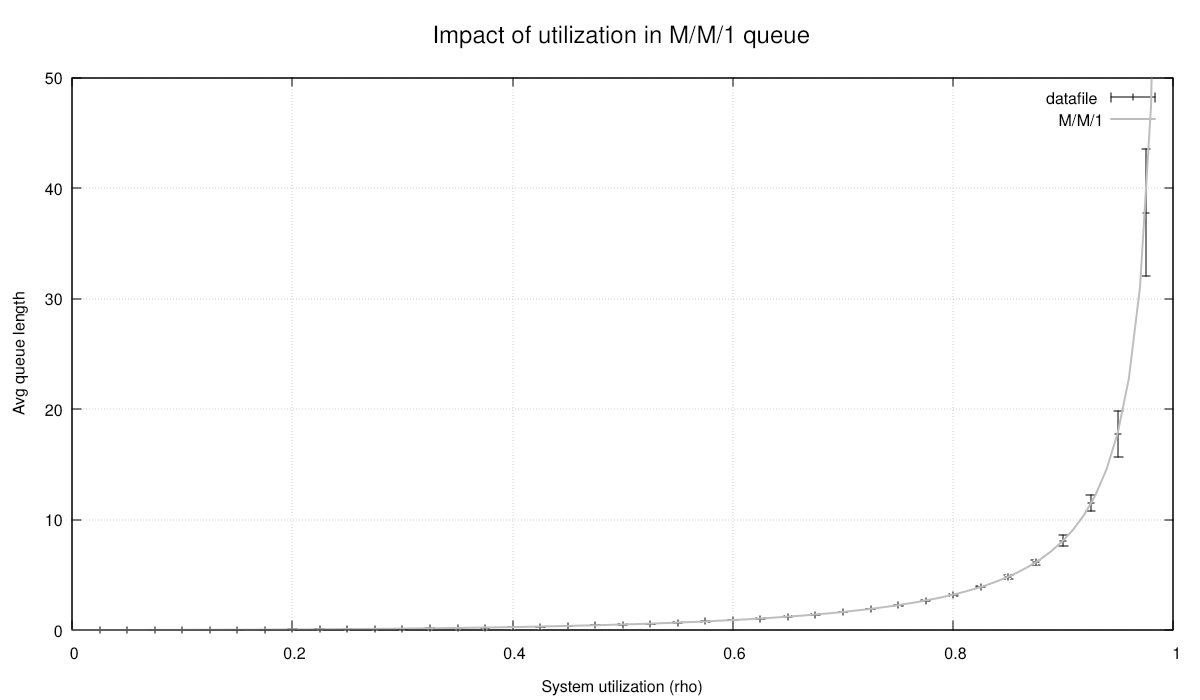
Evidently, we cannot reject the null hypothesis that conventional queuing theory may be correct. Nor can we reject the hypothesis that Cimba may be working correctly.
Seed management
Since we used cmb_random_hwseed() to seed the pseudo-random number generators in
each trial, our pseudo-random number generators are seeded with real entropy from the
computer hardware. If we run the model again, we will get a slightly different result.
This independence is of course a good thing, but we may also need reproducibility.
We can make our simulation reproducible by providing a master seed as input, e.g., on the command line, and then use a hashing function to create different seeds for each trial in the experiment. We can also provide other simulation parameters in the same way:
#include <errno.h>


int main(const int argc, char *argv[])
{
    /* Can be set on command line */
    bool timing_enabled = false;
    uint64_t master_seed = cmb_random_hwseed();
    uint32_t n_reps = 10;
    double warmup_s = 1000.0;
    double duration_s = 1.0e6;

    /* Not yet added to command line params */
    const unsigned n_rhos = 39;
    const double rho_start = 0.025;
    const double rho_step = 0.025;
    const double srv_rate = 1.0;

    /* Parse command line options, if any */
    int opt;
    while ((opt = getopt(argc, argv, "d:n:s:tw:")) != -1) {
        switch (opt) {
            case 'd': {
                errno = 0;
                duration_s = strtod(optarg, NULL);
                if (errno != 0 || duration <= 0.0) {
                    fprintf(stderr, "Invalid argument %s\n", optarg);
                    return EXIT_FAILURE;
                }
                break;
            }
            case 'n': {
                errno = 0;
                n_reps = (uint32_t)strtoul(optarg, NULL, 0);
                if (errno != 0) {
                    fprintf(stderr, "Invalid argument %s\n", optarg);
                    return EXIT_FAILURE;
                }
                break;
            }
            case 's': {
                errno = 0;
                master_seed = (uint64_t)strtoull(optarg, NULL, 0);
                if (errno != 0 || master_seed == 0u) {
                    fprintf(stderr, "Invalid argument %s\n", optarg);
                    return EXIT_FAILURE;
                }
                break;
            }
            case 't': {
                timing_enabled = true;
                break;
            }
            case 'w': {
                errno = 0;
                warmup_s = (double)strtod(optarg, NULL);
                if (errno != 0 || warmup_time < 0.0) {
                    fprintf(stderr, "Invalid argument %s\n", optarg);
                    return EXIT_FAILURE;
                }
                break;
            }
            default: {
                fprintf(stderr, "Usage: %s [-d <duration>][-n <num_replications>][-s <seed>][-t][-w <warmup_time>]\n", argv[0]);
                return EXIT_FAILURE;
            }
        }
    }
By using the hash function cmb_random_fmix64() and a running trial counter as the
unique nonce value for hashing the trial seed., we can now create suitable
deterministic seeds for each trial in our experiment like this:
printf("Setting up experiment\n");
printf("Master seed: 0x%" PRIx64 "\n", master_seed);
const unsigned n_trials = n_rhos * n_reps;
struct trial *experiment = cmi_calloc(n_trials, sizeof(*experiment));

uint64_t ui_exp = 0u;
double rho = rho_start;
for (unsigned ui_rho = 0u; ui_rho < n_rhos; ui_rho++) {
    for (unsigned ui_rep = 0u; ui_rep < n_reps; ui_rep++) {
        experiment[ui_exp].arr_rate = rho * srv_rate;
        experiment[ui_exp].srv_rate = srv_rate;

        experiment[ui_exp].warmup_s = warmup_s;
        experiment[ui_exp].dur_s = duration_s;
        experiment[ui_exp].seed_used = cmb_random_fmix64(master_seed, ui_exp);

        experiment[ui_exp].avg_queue_length = 0.0;

        ui_exp++;
    }

    rho += rho_step;
}
Each trial can now use its pre-assigned seed:
cmb_random_initialize(trl->seed_used);
We can then type, e.g.:
[ambonvik@Threadripper tutorial]$ ./tut_1_7 -s 0x123456789abcd0 -d 1e7 -n 15 -w 1e6 -t
Cimba version 3.0.0-beta
Setting up experiment
Master seed: 0x123456789abcd0
Executing experiment
0       0.0000      dispatcher      run_MM1_trial (173):  seed: 0xfdec9c60e9175db9 rho: 0.025000
2       0.0000      dispatcher      run_MM1_trial (173):  seed: 0x8c86cd3226e7c39a rho: 0.025000
1       0.0000      dispatcher      run_MM1_trial (173):  seed: 0xa0f0a732375fb48f rho: 0.025000
3       0.0000      dispatcher      run_MM1_trial (173):  seed: 0x6efb9a53ec801f99 rho: 0.025000
5       0.0000      dispatcher      run_MM1_trial (173):  seed: 0x7b67c6418c63aae2 rho: 0.025000
6       0.0000      dispatcher      run_MM1_trial (173):  seed: 0x8402740fc59daac0 rho: 0.025000
8       0.0000      dispatcher      run_MM1_trial (173):  seed: 0xa622550fd8b73be6 rho: 0.025000
4       0.0000      dispatcher      run_MM1_trial (173):  seed: 0x4074149906797ad1 rho: 0.025000
11      0.0000      dispatcher      run_MM1_trial (173):  seed: 0xf92ed9cb02c4ffad rho: 0.025000
16      0.0000      dispatcher      run_MM1_trial (173):  seed: 0x7965a67ab345d26e rho: 0.050000
7       0.0000      dispatcher      run_MM1_trial (173):  seed: 0x85c4ac085200f398 rho: 0.025000
14      0.0000      dispatcher      run_MM1_trial (173):  seed: 0x2681e145aa262b4d rho: 0.025000
9       0.0000      dispatcher      run_MM1_trial (173):  seed: 0xf80baffa542f3b03 rho: 0.025000
10      0.0000      dispatcher      run_MM1_trial (173):  seed: 0xee25017da603acb5 rho: 0.025000

...

578     0.0000      dispatcher      run_MM1_trial (173):  seed: 0xc7d13810b2cd773b rho: 0.975000
579     0.0000      dispatcher      run_MM1_trial (173):  seed: 0x5d20f8af7ddbb0c4 rho: 0.975000
580     0.0000      dispatcher      run_MM1_trial (173):  seed: 0x4c79c5afe47c077a rho: 0.975000
581     0.0000      dispatcher      run_MM1_trial (173):  seed: 0x24e1643bbf3f2bef rho: 0.975000
582     0.0000      dispatcher      run_MM1_trial (173):  seed: 0x218448f76e55882c rho: 0.975000
583     0.0000      dispatcher      run_MM1_trial (173):  seed: 0x87cf1c7dd681deb2 rho: 0.975000
584     0.0000      dispatcher      run_MM1_trial (173):  seed: 0xb6c0c5fb0077fbe3 rho: 0.975000
Finished experiment, writing results to file
It took 17.6253 sec
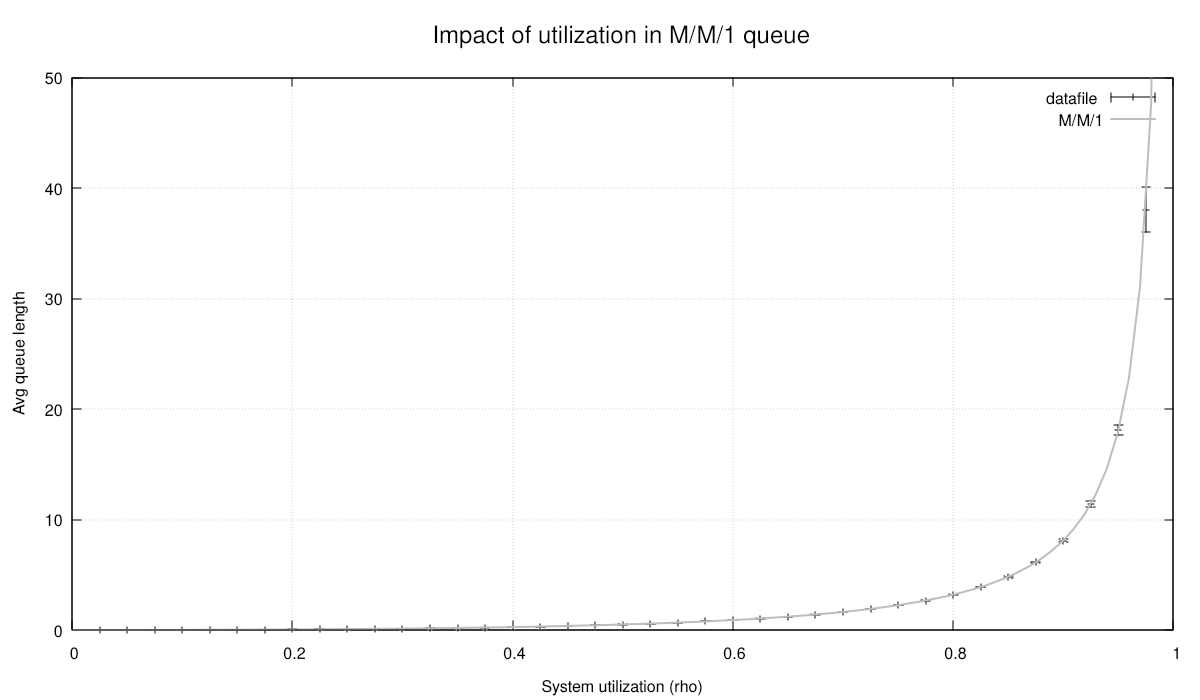
The chart looks similar, but since we used longer run times and more replications, our confidence intervals are tighter:
This concludes our first tutorial. We have followed the development steps from a
first minimal model with basic process interactions to a complete parallelized
experiment with graphical output. The files tutorial/tut_1_*.c include working
code for each stage of development.
For additional variations of this theme, see
benchmark/MM1_multi.c
where the queue is modeled as a cmb_objectqueue with individual customers
tracking their time in the system, and
test/test_cimba.c
modeling a M/G/1 queue with different utilizations and service time varibilities.
Acquiring, preempting, holding, and releasing resources, with interruptions
We will now introduce the Cimba methods for acquiring and releasing resources of various kinds. We will also show additional process interactions where the active process is acting directly on some other process. We will demonstrate these through a somewhat cartoonish example. First, some necessary background.
Resources and resource pools
Cimba provides two kinds of resources that a process can acquire, hold, and release.
These are the cmb_resource and the cmb_resourcepool. The difference is
that the cmb_resource is a single unit that only can be held by one process
at a time, while the cmb_resourcepool consists of several units that each
can be held by a process. A process may hold more than one unit from the
cmb_resourcepool, but there is a certain upper limit for how many units are
available simultaneously from the pool. In computer science terms, the
cmb_resource is a binary semaphore, while the cmb_resourcepool is a
counting semaphore.
If the requested resource or number of resources is not available, the _acquire
calls will wait in a priority queue until the requested amount becomes available.
The ordering is determined first by the process priority, then FIFO based on the
simulation timestamp when it entered the queue. Changing a process’ priority with
cmb_process_priority_set() will also have effect on any priority queues it may
be waiting in, with no need to explicitly reorder the queue from the application.
The typical usage pattern is also the reason for the name cmb_process_hold():
cmb_resource_acquire(res);
cmb_process_hold(dur);
cmb_resource_release(res);
Or:
cmb_resourcepool_acquire(respl, 6);
cmb_process_hold(dur);
cmb_resourcepool_release(respl, 3);
cmb_process_hold(dur);
cmb_resourcepool_release(respl, 3);
Or even:
cmb_resourcepool_acquire(respl, 6);
cmb_resource_acquire(res);
cmb_process_hold(dur);
cmb_resource_release(res);
cmb_resourcepool_release(respl, 6);
Note that there is no timeout argument in these calls. We will show how to do this in the next tutorial, but will leave it as a (very small) cliffhanger until then.
Note also that there are some differences between the _acquire()/_release() pairs
and the similar _get()/_put() pairs for buffers and queues. Suppose that you
have a cmb_buffer of maximal size 10. It is still possible to call
cmb_buffer_put(bufp, 100). The call just puts in 10 to begin with, waits for
someone to get one or more of them, and then keeps refilling the queue until all 100 are
put in. The call only returns at that point (unless interrupted, which we will discuss in
a moment). Similarly, cmb_buffer_get(bufp, 100) works as expected, and trying to
_put() another item into a full cmb_objectqueue or
cmb_priorityqueue just suspends the caller until space becomes available.
Resources and resource pools are not like that. Requesting more from a resource pool
than its maximum is an error. If we have a resource pool with maximum size 10, 5 of
which already are in use, it is fine to call cmb_resourcepool_acquire(rpp, 10). The
call just waits until all 10 are available, accumulating its holding whenever some
become available until it has all, and then returns. On the other hand, calling
cmb_resourcepool_acquire(rpp, 11) will not work. It is not a meaningful call, so
Cimba will do the most helpful thing it can: Trip an assert() and crash your program
on the spot, encouraging you to find and fix the error. (See the
explanatory section for more about the Cimba error handling
philosophy.)
Preemptions and interruptions
We have already explained that Cimba processes (and the coroutines they are
derived from) execute atomically until they explicitly yield control. These
yield (and resume) points are hidden inside functions like cmb_process_hold()
or cmb_resource_acquire(). Inside the call, control may (or may not) be
passed to some other process. The call will only return when control is transferred
back to this process. To the calling process just sitting on its own stack, it
looks very simple, just another function call, but a lot of things may be happening
elsewhere in the model in the meantime.
A yielded process does not have any guarantees for what may be happening to it before it resumes control. Other processes may act on this process, perhaps stopping it outright, waking it up early, or snatching a resource away from it.
To be able to tell the difference, functions like cmb_process_hold() and
cmb_resource_acquire() have an integer return value, an int64_t. We have
quietly ignored the return values in our earlier examples, but they are an
important signalling mechanism between Cimba processes.
Cimba has reserved a few possible return values for itself. Most importantly,
CMB_PROCESS_SUCCESS (numeric value 0) means a normal and successful return.
For example, if cmb_process_hold() returns CMB_PROCESS_SUCCESS, the
calling process knows that it was woken up at the scheduled time without any shenanigans.
The second most important value is CMB_PROCESS_PREEMPTED. That means that a
higher priority process just forcibly took away some resource held by this
process. There are also CMB_PROCESS_INTERRUPTED, CMB_PROCESS_STOPPED,
CMB_PROCESS_CANCELLED, and CMB_PROCESS_TIMEOUT. These predefined signals
are all defined as small negative values, leaving an enormous number of available
signal values to application-defined meanings. In particular, all positive
integers are available to the application for coding various interrupt signals
between processes.
These signal values create a rich set of direct process interactions. As an
example, suppose some process currently holds 10 units from some resource pool.
It then calls cmb_resourcepool_acquire() requesting 10 more units. At that
moment, only 5 are available. The process takes these 5 and adds itself to the
priority queue maintained by the resource guard before yielding. In effect, it asks
to be woken up whenever some more is available, intending to return from its
acquire call only when all 10 units have been collected.
There are now three different outcomes for the _acquire() call:
All goes as expected, 5 more units eventually become available, the process takes them, and returns
CMB_PROCESS_SUCCESS. It now holds 20 units.Some higher priority process calls
cmb_resourcepool_preempt()and this process is targeted. The higher priority process takes all units held by the victim process. Its acquire call returnsCMB_PROCESS_PREEMPTED. It now holds 0 units.Some other process calls
cmb_process_interrupt()on this process. It excuses itself from the resource guard priority queue and returns whatever signal value was given tocmb_process_interrupt(), perhapsCMB_PROCESS_INTERRUPTEDor some other value that has an application-defined meaning. It unwinds the 5 units it collected during the call and returns holding the same amount as it held before callingcmb_resourcepool_acquire(), 10 units.
Preempt calls can themselves be preempted by higher priority processes or interrupted in the same way as acquire calls if the preempt was not immediately fulfilled and the process had to wait at the resource guard. Once there, it is fair game for preempts and interrupts.
Another potential complexity: Suppose a process holds more than one type of resource, for example:
cmb_resource_acquire(rp);
cmb_resourcepool_acquire(rsp1, 10);
cmb_resourcepool_acquire(rsp2, 15);

int64_t signal = cmb_process_hold(100,0);

if (signal == CMB_PROCESS_PREEMPTED) {
    /* ??? */
}
In cases like this, the functions cmb_resource_held_by_process() and
cmb_resourcepool_held_by_process() with a pointer to the process itself as the
second argument can be useful to figure out which resource was preempted. If the caller
does not have a pointer to itself handy (it is always the first argument to the
process function), it can get one by calling cmb_process_current(),
returning a pointer to the currently executing process, i.e. the caller.
Buffers and object queues, interrupted
The semantics of buffers and object queues are different from the resources and resource pools. A process can acquire and hold a resource, making it unavailable for other processes until it is released. Preempting it naturally means taking the resource away from the process because someone else needs it more, right now.
Buffers and their cousins act differently. Once something is put in, other
processes can get it and consume it immediately. Preempting a put or get operation
does not have any obvious meaning. If a buffer is empty, a process get call is waiting
at the resource guard, and a higher priority process wants to get some first, it
just calls cmb_buffer_get() and goes first in the priority queue.
However, waiting puts and gets can still be interrupted. For the
cmb_objectqueue
and cmb_priorityqueue, it is very simple. If the respective _put() or
_get() call returned CMB_PROCESS_SUCCESS the object was successfully
added to the queue or retrieved from it. If it returned anything else, it was not.
The cmb_buffer is similarly intuitive. Recall from
our first tutorial
that the amount argument is given as a pointer to a variable, not as a value. As
the put and get calls get underway, the value at this location is updated to
reflect the progress. If interrupted, this value indicates how much was placed
or obtained. The call returns at this point with no attempt to roll back to the
state at the beginning of the call. If successful, the put call will return
CMB_PROCESS_SUCCESS and have a zero value in this location. Similarly, the
_get() call
will have the requested amount. If interrupted, it will return something else and
the amount variable will contain some other value between zero and the requested amount.
While the cat is away…
It is again probably easier to demonstrate with code than explain in computer sciencey terms how all this works.
On a table, we have some pieces of cheese in a pile. There are several mice trying to collect the cheese and hold it for a while. Each mouse can carry different numbers of cheese cubes. They tend to drop it again quite fast, inefficient hoarders as they are. Unfortunately, there are also some rats, bigger and stronger than the mice. The rats will preempt the cheese from the mice, but only if the rat has higher priority. Otherwise, the rat will politely wait its turn. There is also a cat. It sleeps a lot, but when awake, it will select a random rodent and interrupt whatever it is doing.
Since we do not plan to run any statistics here, we simplify the context struct to just the simulation struct. We can then write something like:
/* The busy life of a mouse */
void *mousefunc(struct cmb_process *me, void *ctx)
{
    cmb_assert_release(me != NULL);
    cmb_assert_release(ctx != NULL);

    const struct simulation *simp = ctx;
    struct cmb_resourcepool *sp = simp->cheese;
    uint64_t amount_held = 0u;

    while (true) {
        /* Decide on a random amount to get next time and set a random priority */
        const uint64_t amount_req = cmb_random_dice(1, 5);
        const int64_t pri = cmb_random_dice(-10, 10);
        cmb_process_set_priority(me, pri);
        cmb_logger_user(stdout, USERFLAG1, "Acquiring %" PRIu64, amount_req);
        int64_t sig = cmb_resourcepool_acquire(sp, amount_req);
        if (sig == CMB_PROCESS_SUCCESS) {
            /* Acquire returned successfully */
            amount_held += amount_req;
            cmb_logger_user(stdout, USERFLAG1, "Success, new amount held: %" PRIu64, amount_held);
        }
        else if (sig == CMB_PROCESS_PREEMPTED) {
            /* The acquire call did not end well */
            cmb_logger_user(stdout, USERFLAG1, "Preempted during acquire, all my %s is gone",
                            cmb_resourcepool_name(sp));
            amount_held = 0u;
        }
        else {
            /* Interrupted, but we still have the same amount as before */
            cmb_logger_user(stdout, USERFLAG1, "Interrupted by signal %" PRIi64, sig);
        }

        /* Hold on to it for a while */
        sig = cmb_process_hold(cmb_random_exponential(1.0));
        if (sig == CMB_PROCESS_SUCCESS) {
            /* We still have it */
            cmb_logger_user(stdout, USERFLAG1, "Hold returned successfully");
        }
        else if (sig == CMB_PROCESS_PREEMPTED) {
            /* Somebody snatched it all away from us */
            cmb_logger_user(stdout, USERFLAG1, "Someone stole all my %s from me!",
                            cmb_resourcepool_name(sp));
            amount_held = 0u;
        }
        else {
            /* Interrupted while holding. Still have the cheese, though */
            cmb_logger_user(stdout, USERFLAG1, "Interrupted by signal %" PRIi64, sig);
        }

        /* Drop some amount */
        if (amount_held > 1u) {
            const uint64_t amount_rel = cmb_random_dice(1, amount_held);
            cmb_logger_user(stdout, USERFLAG1, "Holds %" PRIu64 ", releasing %" PRIu64,
                            amount_held, amount_rel);
            cmb_resourcepool_release(sp, amount_rel);
            amount_held -= amount_rel;
        }

        /* Hang on a moment before trying again */
        cmb_logger_user(stdout, USERFLAG1, "Holding, amount held: %" PRIu64, amount_held);
        sig = cmb_process_hold(cmb_random_exponential(1.0));
        if (sig == CMB_PROCESS_PREEMPTED) {
            cmb_logger_user(stdout, USERFLAG1,
                            "Someone stole the rest of my %s, signal %" PRIi64,
                            cmb_resourcepool_name(sp), sig);
            amount_held = 0u;
       }
    }
}
The rats are pretty much the same as the mice, just a bit hungrier and stronger
(i.e. assigning themselves somewhat higher priorities), and using
cmb_resourcepool_preempt() instead of _acquire():
/* Decide on a random amount to get next time and set a random priority */
const uint64_t amount_req = cmb_random_dice(3, 10);
const int64_t pri = cmb_random_dice(-5, 15);
cmb_process_set_priority(me, pri);
cmb_logger_user(stdout, USERFLAG1, "Preempting %" PRIu64, amount_req);
int64_t sig = cmb_resourcepool_preempt(sp, amount_req);
The cats, on the other hand, are never interrupted and just ignore return values:
void *catfunc(struct cmb_process *me, void *ctx)
{
    cmb_unused(me);
    cmb_assert_release(ctx != NULL);

    struct simulation *simp = ctx;
    struct cmb_process **cpp = (struct cmb_process **)simp;
    const long num = NUM_MICE + NUM_RATS;

    while (true) {
        /* Nobody interrupts a sleeping cat, disregard return value */
        cmb_logger_user(stdout, USERFLAG1, "Zzzzz...");
        (void)cmb_process_hold(cmb_random_exponential(5.0));
        do {
            cmb_logger_user(stdout, USERFLAG1, "Awake, looking for rodents");
            (void)cmb_process_hold(cmb_random_exponential(1.0));
            struct cmb_process *tgt = cpp[cmb_random_dice(0, num - 1)];
            cmb_logger_user(stdout, USERFLAG1, "Chasing %s", cmb_process_name(tgt));

            /* Send it a random interrupt signal */
            const int64_t sig = (cmb_random_flip()) ?
                                 CMB_PROCESS_INTERRUPTED :
                                 cmb_random_dice(10, 100);
            cmb_process_interrupt(tgt, sig, 0);

            /* Flip a coin to decide whether to go back to sleep */
        } while (cmb_random_flip());
    }
}
The complete code is in tutorial/tut_2_1.c We compile and run, and get output similar to this:
[ambonvik@Threadripper cimba]$ build/tutorial/tut_3_1 | more
Create a pile of 20 cheese cubes
Create 5 mice to compete for the cheese
Create 2 rats trying to preempt the cheese
Create 1 cats chasing all the rodents
Schedule end event
Execute simulation...
    0.0000  Cat_1   catfunc (218):  Zzzzz...
    0.0000  Rat_2   ratfunc (151):  Preempting 4
    0.0000  Rat_2   ratfunc (156):  Success, new amount held: 4
    0.0000  Mouse_4 mousefunc (77):  Acquiring 1
    0.0000  Mouse_4 mousefunc (82):  Success, new amount held: 1
    0.0000  Rat_1   ratfunc (151):  Preempting 8
    0.0000  Rat_1   ratfunc (156):  Success, new amount held: 8
    0.0000  Mouse_1 mousefunc (77):  Acquiring 5
    0.0000  Mouse_1 mousefunc (82):  Success, new amount held: 5
    0.0000  Mouse_3 mousefunc (77):  Acquiring 2
    0.0000  Mouse_3 mousefunc (82):  Success, new amount held: 2
    0.0000  Mouse_5 mousefunc (77):  Acquiring 1
    0.0000  Mouse_2 mousefunc (77):  Acquiring 3
   0.23852  Mouse_1 mousefunc (99):  Hold returned normally
   0.23852  Mouse_1 mousefunc (115):  Holds 5, releasing 5
   0.23852  Mouse_1 mousefunc (122):  Holding, amount held: 0
   0.23852  Mouse_5 mousefunc (82):  Success, new amount held: 1
   0.23852  Mouse_2 mousefunc (82):  Success, new amount held: 3
   0.30029  Cat_1   catfunc (221):  Awake, looking for rodents
   0.46399  Mouse_2 mousefunc (99):  Hold returned normally
   0.46399  Mouse_2 mousefunc (115):  Holds 3, releasing 1
   0.46399  Mouse_2 mousefunc (122):  Holding, amount held: 2
   0.56088  Mouse_1 mousefunc (77):  Acquiring 1
   0.56088  Mouse_1 mousefunc (82):  Success, new amount held: 1
   0.58910  Mouse_4 mousefunc (99):  Hold returned normally
   0.58910  Mouse_4 mousefunc (122):  Holding, amount held: 1
   0.73649  Mouse_5 mousefunc (99):  Hold returned normally
   0.73649  Mouse_5 mousefunc (122):  Holding, amount held: 1
   0.74171  Mouse_3 mousefunc (99):  Hold returned normally
   0.74171  Mouse_3 mousefunc (115):  Holds 2, releasing 2
   0.74171  Mouse_3 mousefunc (122):  Holding, amount held: 0
   0.83936  Mouse_3 mousefunc (77):  Acquiring 4
   0.89350  Mouse_5 mousefunc (77):  Acquiring 5
    1.3408  Rat_2   ratfunc (173):  Hold returned normally
    1.3408  Rat_2   ratfunc (189):  Holds 4, releasing 1
    1.3408  Rat_2   ratfunc (196):  Holding, amount held: 3
    1.3408  Mouse_3 mousefunc (82):  Success, new amount held: 4
    1.4394  Mouse_4 mousefunc (77):  Acquiring 5
    1.8889  Mouse_2 mousefunc (77):  Acquiring 1
    1.8992  Mouse_3 mousefunc (99):  Hold returned normally
    1.8992  Mouse_3 mousefunc (115):  Holds 4, releasing 4
    1.8992  Mouse_3 mousefunc (122):  Holding, amount held: 0
    1.9260  Mouse_1 mousefunc (99):  Hold returned normally
    1.9260  Mouse_1 mousefunc (122):  Holding, amount held: 1
    2.5697  Mouse_3 mousefunc (77):  Acquiring 3
    3.1025  Mouse_1 mousefunc (77):  Acquiring 4
    3.7215  Rat_2   ratfunc (151):  Preempting 6
    3.7215  Mouse_4 mousefunc (86):  Preempted during acquire, all my Cheese is gone
    3.7215  Mouse_1 mousefunc (86):  Preempted during acquire, all my Cheese is gone
    4.2186  Mouse_1 mousefunc (99):  Hold returned normally
    4.2186  Mouse_1 mousefunc (122):  Holding, amount held: 0
    4.7152  Mouse_1 mousefunc (77):  Acquiring 5
    4.8393  Cat_1   catfunc (224):  Chasing Mouse_1
    4.8393  Cat_1   catfunc (221):  Awake, looking for rodents
    4.8393  Mouse_1 mousefunc (92):  Interrupted by signal -2
    5.3060  Cat_1   catfunc (224):  Chasing Mouse_4
    5.3060  Cat_1   catfunc (221):  Awake, looking for rodents
    5.3060  Mouse_4 mousefunc (109):  Interrupted by signal 20
    5.3060  Mouse_4 mousefunc (122):  Holding, amount held: 0
    5.8149  Mouse_1 mousefunc (99):  Hold returned normally
    5.8149  Mouse_1 mousefunc (122):  Holding, amount held: 0
    6.0788  Mouse_1 mousefunc (77):  Acquiring 4
    6.1803  Rat_1   ratfunc (173):  Hold returned normally
    6.1803  Rat_1   ratfunc (189):  Holds 8, releasing 3
    6.1803  Rat_1   ratfunc (196):  Holding, amount held: 5
…and so on. The interactions can get rather intricate, but hopefully intuitive:
A cmb_resourcepool_preempt() call will start from the lowest priority victim
process and take all of its resource, but only if the victim has strictly lower
priority than the caller. If the requested amount is not satisfied from the first
victim, it will continue to the next lowest priority victim. If some amount is
left over after taking everything the victim held, the resource guard is signalled
to evaluate what process gets the remainder. If no potential victims with strictly
lower priority than the caller process exists, the caller will join the priority
queue and wait in line for some amount to become available.
Cimba does not try to be “fair” or “optimal” in its resource allocation, just efficient and predictable. If the application needs different allocation rules, it can either adjust process priorities dynamically or create a derived class with a custom demand function.
It is possible to create deadlocks if multiple processes are waiting for each other. If you build a model with that property, such as Dijkstra’s famous Dining Philosophers, the purpose of the model could be to compare the performance of different deadlock prevention algorithms. That logic belongs in the user model, not hidden inside Cimba.
Real world uses
The example above was originally written as part of the Cimba unit test suite to ensure that the library tracking of how many units each process holds from the resource pool always matches the expected values calculated here. We wanted to make very sure that this is correct in all possible sequences of events, hence this frantic stress test with preemptions and interruptions galore.
The preempt and interrupt mechanisms are important in a range of real-world modeling applications, ranging from hospital emergency room triage operations to manufacturing job shops and machine breakdown processes.
Building, validating, and parallelizing the simulation will follow the same pattern as in our first tutorial, so we will not repeat that here.
This completes our second tutorial, demonstrating how to “_acquire() and
_release() resources, and to use direct process interactions like
cmb_process_interrupt() and cmb_resourcepool_preempt().
We also have mentioned, but not demonstrated cmb_process_wait_process()
and cmb_process_wait_event(). We encourage you to look up these in
the API reference documentation
next.
Agents balking, reneging, and jockeying in queues
In our first tutorial, we modeled a M/M/1 queue as a simple buffer with just a numeric value for the queue length. This was sufficient to calculate queue length statistics. We have extended this in our benchmarking case, benchmark/MM1_simple.c and benchmark/MM1_multi.c, where the customers were modeled as discrete objects containing their own arrival times to compute statistics for the time each customer spent in the system. In both cases, our simulated results were well aligned with known queuing theory formulas.
We now extend this to a more realistic but analytically intractable case where the
customers are active, opinionated agents in their own right. The customers generated by
the arrival process will make their own decisions on whether to join the queue or not
(balking), leave midway (reneging), or switch to another queue that seems to be moving
faster (jockeying). Or patiently wait until they get served and then leave for new
adventures. Since the active entities in Cimba are the instances of
cmb_process,
this requires each customer to be represented as a process or a class derived from
the process. We will make our customers a derived class from the
cmb_process, inheriting its properties and methods, and adding some more
specifics.
The use case is to model an amusement park with guests wanting to use various attractions. Our customer, the park operator, wants us to analyze ways of influencing customer behavior. The overall metric is the time spent in the park per visitor and the breakdown of this time between riding, waiting, and walking. The time unit is minutes.
Classes derived from cmb_process
The object-oriented paradigm is very natural for simulation modeling, and was first developed for this purpose in Simula67. Obviously, C does not directly support object-orientation as a language feature, but is flexible enough to support an object-oriented programming style. We will discuss this in more detail in the background section. In this tutorial we will just focus on how to use it.
Basically, in object-oriented C, the struct becomes the class. By placing one
struct as the first member of another, the outer struct effectively becomes a derived
class from the inner one. A pointer to the outer struct will point to the same address
as the inner struct, and one can freely cast the same pointer value between the two
types. They exist at the same memory address.
For example, we want our server process to also contain a pointer to the queue it gets
visitors from, the number of visitors that can board for each run of the ride, and the
parameters of the service time distribution. We could pass this to a plain
cmb_process as part of its context initialization argument, but we can
also create a derived struct server as a derived class from the
cmb_process:
struct server {
    struct cmb_process core;       /* <= Note: The real thing, not a pointer */
    struct cmb_priorityqueue *pq;
    unsigned batch_size;
    double dur_min, dur_mode, dur_max;
};
It is important to note that the first member of the struct is the parent class struct itself, not a pointer to an object of that class. We can now define the core methods of the server class:
struct server *server_create(void)
{
    struct server *sp = malloc(sizeof(struct server));
    cmb_assert_release(sp != NULL);
    return sp;
}

void server_initialize(struct server *sp,
                       const char *name,
                       struct cmb_priorityqueue *qp,
                       const unsigned bs,
                       const double dmin, const double dmod, const double dmax)
{
    sp->pq = qp;
    sp->batch_size = bs;
    sp->dur_min = dmin;
    sp->dur_mode = dmod;
    sp->dur_max = dmax;

    cmb_process_initialize(&sp->core, name, serverfunc, NULL, 0u);
}

void server_start(struct server *sp)
{
    cmb_process_start(&sp->core);
}

void server_terminate(struct server *sp)
{
    cmb_process_terminate(&sp->core);
}

void server_destroy(struct server *sp)
{
    free(sp);
}
The most important member function is the server process function itself. It gets a group of
suspended visitor processes from the priority queue, loads them into the attraction,
holds them for the duration of the ride, stores some statistics in them, before
resuming them as active processes. It can look like this:
void *serverfunc(struct cmb_process *me, void *vctx)
{
    cmb_assert_debug(me != NULL);
    cmb_unused(vctx);
    const struct server *sp = (struct server *)me;

    while (true) {
        /* Prepare for the next batch of visitors */
        unsigned cnt = 0u;
        struct visitor *batch[sp->batch_size];

        /* Wait for the first visitor, then fill the ride as best possible */
        cmb_logger_user(stdout, LOGFLAG_SERVICE, "Open for next batch");
        do {
            struct visitor *vip;
            (void)cmb_priorityqueue_get(sp->pq, (void**)&(vip));
            struct cmb_process *pp = (struct cmb_process *)vip;
            cmb_process_timers_clear(pp);
            cmb_logger_user(stdout, LOGFLAG_SERVICE, "Got visitor %s", cmb_process_name(pp));
            batch[cnt++] = vip;
        } while ((cmb_priorityqueue_length(sp->pq) > 0) && (cnt < sp->batch_size)) ;

        /* Log the waiting times for this batch of visitors */
        cmb_logger_user(stdout, LOGFLAG_SERVICE, "Has %u for %u slots", cnt, sp->batch_size);
        for (unsigned ui = 0; ui < cnt; ui++) {
            struct visitor *vip = batch[ui];
            const double qt = cmb_time() - vip->entry_time_queue;
            vip->waiting_time += qt;
        }

        /* Run the ride with these visitors on board */
        cmb_logger_user(stdout, LOGFLAG_SERVICE, "Starting ride");
        const double dur = cmb_random_PERT(sp->dur_min, sp->dur_mode, sp->dur_max);
        cmb_process_hold(dur);
        cmb_logger_user(stdout, LOGFLAG_SERVICE, "Ride finished");

        /* Unload and send the visitors on their merry way */
        for (unsigned ui = 0u; ui < cnt; ui++) {
            struct visitor *vip = batch[ui];
            vip->riding_time += dur;
            struct cmb_process *pp = (struct cmb_process *)vip;
            cmb_logger_user(stdout, LOGFLAG_SERVICE, "Resuming visitor %s", cmb_process_name(pp));
            cmb_process_resume(pp, CMB_PROCESS_SUCCESS);
        }
    }
}
Since our processes are asymmetric coroutines, the cmb_process_resume() call
does not directly resume the target process (coroutine), but schedules an event that will
make the dispatcher resume the target process (coroutine). That way, all control passes
through the dispatcher, and all processes are resumed by the dispatcher only. For this
server function, that implies that cmb_process_resume() is a non-blocking
call. It returns immediately and the server can unload all visitors before yielding the
CPU in the cmb_priorityqueue_get() or cmb_process_hold() calls.
Setting and clearing timers
Similarly, we can define the struct visitor as a derived class from the
cmb_process:
struct visitor {
    struct cmb_process core;       /* <= Note: The real thing, not a pointer */
    double patience;
    bool goldcard;
    double entry_time_park;
    double entry_time_queue;
    unsigned current_attraction;
    double riding_time;
    double waiting_time;
    double walking_time;
    unsigned num_attractions_visited;
};
It contains some parameters, such as its patience and whether is a priority gold
card holder, holds some state, such as the current_attraction, and collects some
history, such as the count of attractions visited and the accumulated riding, waiting,
and walking times.
Its creators and destructors are similar to the server’s, but the process function
brings some new features:
void *visitor_proc(struct cmb_process *me, void *vctx)
{
    cmb_assert_debug(me != NULL);
    cmb_assert_debug(vctx != NULL);

    struct visitor *vip = (struct visitor *)me;
    const struct context *ctx = vctx;
    const struct simulation *sim = ctx->sim;

    cmb_logger_user(stdout, LOGFLAG_VISITOR, "Started");
    vip->current_attraction = IDX_ENTRANCE;
    while (vip->current_attraction != IDX_EXIT) {
        /* Select where to go next */
        const unsigned ua = vip->current_attraction;
        const struct attraction *ap_from = &sim->park_attractions[ua];
        const struct cmb_random_alias *qv = ap_from->quo_vadis;
        const unsigned nxt = cmb_random_alias_sample(qv);
        cmb_logger_user(stdout, LOGFLAG_VISITOR, "At %u, next %u", ua, nxt);

        /* Walk there */
        const double mwt = transition_times[ua][nxt];
        const double wt = cmb_random_PERT(0.5 * mwt, mwt, 2.0 * mwt);
        cmb_process_hold(wt);
        vip->walking_time += wt;
        vip->current_attraction = nxt;

        /* Join the shortest queue if several */
        if (nxt != IDX_EXIT) {
            const struct attraction *ap_to = &sim->park_attractions[nxt];
            uint64_t shrtlen = UINT64_MAX;
            unsigned shrtqi = 0u;
            for (unsigned qi = 0u; qi < ap_to->num_queues; qi++) {
                struct cmb_priorityqueue *pq = ap_to->queues[qi];
                const unsigned len = cmb_priorityqueue_length(pq);
                if (len < shrtlen) {
                    shrtlen = len;
                    shrtqi = qi;
                }
            }

            cmb_logger_user(stdout, LOGFLAG_VISITOR,
                            "At attraction %u, queue %u looks shortest (%" PRIu64 ")",
                            nxt, shrtqi, shrtlen);

            /* Balking? */
            if (shrtlen > (uint64_t)(vip->patience * balking_threshold)) {
                /* Too long queue, go to next instead */
                cmb_logger_user(stdout, LOGFLAG_VISITOR,
                                "Balked at attraction %u, queue %u", nxt, shrtqi);
                continue;
            }

            /* Set two timeouts */
            const double jt = vip->patience * jockeying_threshold;
            cmb_process_timer_set(me, jt, TIMER_JOCKEYING);
            const double rt = vip->patience * reneging_threshold;
            cmb_process_timer_add(me, rt, TIMER_RENEGING);

            struct cmb_priorityqueue *q = sim->park_attractions[nxt].queues[shrtqi];
            uint64_t pq_hndl;
            cmb_logger_user(stdout, LOGFLAG_VISITOR,
                            "Joining queue %s", cmb_priorityqueue_name(q));
            vip->entry_time_queue = cmb_time();
            /* Not blocking, since the queue has unlimited size */
            cmb_priorityqueue_put(q, (void *)vip, cmb_process_priority(me), &pq_hndl);

            /* Suspend ourselves until we have finished both queue and ride,
             * trusting the server to update our waiting and riding times */
            while (true) {
                const int64_t sig = cmb_process_yield();
                if (sig == TIMER_JOCKEYING) {
                    cmb_logger_user(stdout, LOGFLAG_VISITOR, "Jockeying at attraction %u", nxt);
                    const unsigned in_q = shrtqi;
                    const unsigned mypos = cmb_priorityqueue_position(q, pq_hndl);
                    shrtlen = UINT64_MAX;
                    shrtqi = 0u;
                    for (unsigned qi = 0u; qi < ap_to->num_queues; qi++) {
                        struct cmb_priorityqueue *pq = ap_to->queues[qi];
                        const unsigned len = cmb_priorityqueue_length(pq);
                        if (len < shrtlen) {
                            shrtlen = len;
                            shrtqi = qi;
                        }
                    }

                    if (shrtlen < mypos) {
                        cmb_logger_user(stdout, LOGFLAG_VISITOR,
                                        "Moving from queue %u to queue %u (len %" PRIu64 ")",
                                        in_q, shrtqi, shrtlen);
                        const bool found = cmb_priorityqueue_cancel(q, pq_hndl);
                        cmb_assert_debug(found == true);
                        q = ap_to->queues[shrtqi];
                        const int64_t pri = cmb_process_priority(me);
                        cmb_priorityqueue_put(q, (void *)vip, pri + 1, &pq_hndl);
                        continue;
                    }
                }
                else if (sig == TIMER_RENEGING) {
                    cmb_logger_user(stdout, LOGFLAG_VISITOR, "Reneging at attraction %u", ua);
                    const bool found = cmb_priorityqueue_cancel(q, pq_hndl);
                    cmb_assert_debug(found == true);
                    cmb_process_timers_clear(me);
                    break;
                }
                else {
                    cmb_assert_release(sig == CMB_PROCESS_SUCCESS);
                    vip->num_attractions_visited++;
                    cmb_logger_user(stdout, LOGFLAG_VISITOR,
                                    "Yay! Leaving attraction %u", vip->current_attraction);
                    break;
                }
            }

            /* Out of the attraction, slightly dizzy. Do it again? */
        }
    }

    /* No, enough for today */
    cmb_logger_user(stdout, LOGFLAG_VISITOR, "Leaving");
    cmb_objectqueue_put(sim->departeds, (void *)vip);
    cmb_process_exit(NULL);

    /* Not reached */
    return NULL;
}
To model the jockeying and reneging behavior, we use additional cmb_process
methods: The process can schedule a future timeout event for itself by calling
cmb_process_timer_set(). When the timer event occurs, the process will be
interrupted from whatever it is doing with whatever signal the timer was set to send, with
CMB_PROCESS_TIMEOUT as a predefined possibility. By setting a timeout before
some _acquire(), _get(), or _wait() call, the process can abort the wait when
patience runs out.
Here, we set two different timers, one with the signal TIMER_JOCKEYING and one with
TIMER_RENEGING. After these are set, the visitor process suspends itself
unconditionally by calling cmb_process_yield() after entering the
cmb_priorityqueue. The visitor process is then a passive object managed by
the server process until it is resumed by the server, or until one of the timers goes off
and it awakes with a start and shows signs of impatience.
Note that the timers remain active past the call to cmb_priorityqueue_put().
The timers are part of the process state, not the function call. They remain active
until either going off or getting cancelled / cleared. In this case, we cancel the
jockeying timer if the reneging timer goes off, but not the other way around, since
they model two different behaviors.
Note also that one of the first things the server process does after getting a visitor
from the priority queue is to call cmb_process_timers_clear() to make sure it
does not suddenly wake up and walk off in the middle of the ride. Conversely, one of the
first things the visitor process does after waking up on a timer signal is to call
cmb_priorityqueue_cancel() to make sure that it is not admitted on a ride
when it actually is walking away from that attraction.
The entire dynamic of having the same process object act both as an active opinionated agent in its simulated world, and as a passive object being handled by other processes is enabled by our processes being stackful coroutines. When suspended, their entire state is safely stored on their own execution stack until it is resumed from the same point where it left off. Our processes are first-class objects that can be passed around as function arguments and return values, stored and retrieved, created and destroyed at runtime.
Also note that the visitor process ends by placing itself in the
cmb_objectqueue of departed visitors before exiting. That way, a departure
process can wait for it there, collect its statistics, and reclaim its allocated memory:
void *departure_proc(struct cmb_process *me, void *vctx)
{
    cmb_unused(me);
    cmb_assert_debug(vctx != NULL);

    const struct context *ctx = vctx;
    struct simulation *sim = ctx->sim;

    while (true) {
        /* Wait for a departing visitor */
        struct visitor *vip = NULL;
        (void)cmb_objectqueue_get(sim->departeds, (void **)(&vip));
        cmb_assert_debug(vip != NULL);
        struct cmb_process *pp = (struct cmb_process *)vip;
        cmb_assert_debug(cmb_process_status(pp) == CMB_PROCESS_FINISHED);
        cmb_logger_user(stdout, LOGFLAG_DEPARTURE, "%s departed",
                        ((struct cmb_process *)vip)->name);

        /* Collect its statistics */
        const double tsys = cmb_time() - vip->entry_time_park;
        cmb_datasummary_add(&sim->time_in_park, tsys);
        cmb_datasummary_add(&sim->riding_times, vip->riding_time);
        cmb_datasummary_add(&sim->waiting_times, vip->waiting_time);
        cmb_datasummary_add(&sim->num_rides, vip->num_attractions_visited);
        cmb_datasummary_add(&sim->walking_times, vip->walking_time);

        /* Reclaim its memory allocation */
        visitor_terminate(vip);
        visitor_destroy(vip);
    }
}
Here, we have not bothered to define this as a derived class, but just pass it the
pointer to the departeds object queue as part of the context argument.
Alias sampling probabilities
We model the amusement park attractions as nodes in a fully-connected network. Node 0 will be the entrance, while nodes 1 through n are the attractions, and node n+1 is the exit. Each node (except the entrance and the exit) has one or more priority queues for waiting customers. For each node i, there is a certain probability that the customer goes to attraction j next, including both the possibility of exiting the park and the possibility of taking another go on the same attraction. This can be represented as a matrix of transition probabilities p(i, j).
However, the obvious sampling algorithm is rather slow for large n: Generate a random
number x in [0, 1]. Starting j from 0, add p(i, j) until the sum is greater
than x. The current j is then the selected value. (This is implemented in Cimba as
the function cmb_random_loaded_dice().)
Instead, we will use a particularly clever O(1) algorithm known as Vose alias sampling.
It requires us to pre-compute a lookup table that we will store with each node by
calling cmb_random_alias_create(). We can then sample it as often as needed by
calling cmb_random_alias_sample(), and clean it up when no longer needed by
calling cmb_random_alias_destroy(). The overhead in construction and
destruction pays for itself in overall efficiency already for n > 7 or so.
Note
The alert reader will notice that this collapses our usual four-part harmony of
_create(), _initialize(), _terminate(); and _destroy() into just the
two functions _create() and _destroy(). Since we are not planning to create any
derived classes from the alias table, we found this a reasonable exception to make.
It looks like this in the struct attraction:
struct attraction {
    unsigned num_queues;
    struct cmb_priorityqueue **queues;
    unsigned num_servers;
    struct server **servers;
    struct cmb_random_alias *quo_vadis;
};
It is initialized like this in attraction_initialize from one row of the transition
probability matrix:
ap->quo_vadis = cmb_random_alias_create(NUM_ATTRACTIONS + 2, transition_probs[ui]);
and, as we saw above, sampled like this by the visitor_proc when deciding where to
go next.
const unsigned nxt = cmb_random_alias_sample(qv);
It eventually gets destroyed from attraction_terminate():
cmb_random_alias_destroy(ap->quo_vadis);
A day in the park
You can find the rest of the code in tutorials/tut_3_1.c
Running it, we get output like this:
[ambonvik@Threadripper cimba]$ build/tutorial/tut_3_1 | more
    0.0000  Server_01_00_00 serverfunc (186):  Open for next batch
    0.0000  Server_02_00_00 serverfunc (186):  Open for next batch
    0.0000  Server_02_00_01 serverfunc (186):  Open for next batch
    0.0000  Server_02_00_02 serverfunc (186):  Open for next batch
    0.0000  Server_03_00_00 serverfunc (186):  Open for next batch
    0.0000  Server_03_00_01 serverfunc (186):  Open for next batch
    0.0000  Server_04_00_00 serverfunc (186):  Open for next batch
    0.0000  Server_04_01_00 serverfunc (186):  Open for next batch
    0.0000  Server_04_02_00 serverfunc (186):  Open for next batch
    0.0000  Server_05_00_00 serverfunc (186):  Open for next batch
    0.0000  Server_06_00_00 serverfunc (186):  Open for next batch
    0.0000  Server_07_00_00 serverfunc (186):  Open for next batch
    0.0000  Server_08_00_00 serverfunc (186):  Open for next batch
    0.0000  Server_09_00_00 serverfunc (186):  Open for next batch
  0.038977  Arrivals        arrival_proc (529):  Visitor_000001 arriving
  0.038977  Visitor_000001  visitor_proc (336):  Started
  0.038977  Visitor_000001  visitor_proc (344):  At 0, next 2
  0.068032  Arrivals        arrival_proc (529):  Visitor_000002 arriving
  0.068032  Visitor_000002  visitor_proc (336):  Started
  0.068032  Visitor_000002  visitor_proc (344):  At 0, next 1
    1.0330  Arrivals        arrival_proc (529):  Visitor_000003 arriving
    1.0330  Visitor_000003  visitor_proc (336):  Started
    1.0330  Visitor_000003  visitor_proc (344):  At 0, next 1
    1.1268  Arrivals        arrival_proc (529):  Visitor_000004 arriving
    1.1268  Visitor_000004  visitor_proc (336):  Started
    1.1268  Visitor_000004  visitor_proc (344):  At 0, next 2
    2.1046  Visitor_000002  visitor_proc (367):  At attraction 1, queue 0 looks shortest (0)
    2.1046  Visitor_000002  visitor_proc (387):  Joining queue Queue_01_00
    2.1046  Server_01_00_00 serverfunc (192):  Got visitor Visitor_000002
    2.1046  Server_01_00_00 serverfunc (197):  Has 1 for 1 slots
    2.1046  Server_01_00_00 serverfunc (206):  Starting ride
    2.6024  Arrivals        arrival_proc (529):  Visitor_000005 arriving
    2.6024  Visitor_000005  visitor_proc (336):  Started
    2.6024  Visitor_000005  visitor_proc (344):  At 0, next 4
    3.9335  Visitor_000003  visitor_proc (367):  At attraction 1, queue 0 looks shortest (0)
    3.9335  Visitor_000003  visitor_proc (387):  Joining queue Queue_01_00
    4.2126  Arrivals        arrival_proc (529):  Visitor_000006 arriving
    4.2126  Visitor_000006  visitor_proc (336):  Started
    4.2126  Visitor_000006  visitor_proc (344):  At 0, next 1
    4.4175  Visitor_000001  visitor_proc (367):  At attraction 2, queue 0 looks shortest (0)
    4.4175  Visitor_000001  visitor_proc (387):  Joining queue Queue_02_00
    4.4175  Server_02_00_00 serverfunc (192):  Got visitor Visitor_000001
    4.4175  Server_02_00_00 serverfunc (197):  Has 1 for 5 slots
    4.4175  Server_02_00_00 serverfunc (206):  Starting ride
    6.2520  Server_01_00_00 serverfunc (209):  Ride finished
    6.2520  Server_01_00_00 serverfunc (218):  Resuming visitor Visitor_000002
    6.2520  Server_01_00_00 serverfunc (186):  Open for next batch
    6.2520  Server_01_00_00 serverfunc (192):  Got visitor Visitor_000003
    6.2520  Server_01_00_00 serverfunc (197):  Has 1 for 1 slots
    6.2520  Server_01_00_00 serverfunc (206):  Starting ride
    6.2520  Visitor_000002  visitor_proc (434):  Yay! Leaving attraction 1
    6.2520  Visitor_000002  visitor_proc (344):  At 1, next 2
    8.9219  Visitor_000006  visitor_proc (367):  At attraction 1, queue 0 looks shortest (0)
    8.9219  Visitor_000006  visitor_proc (387):  Joining queue Queue_01_00
    9.2341  Visitor_000002  visitor_proc (367):  At attraction 2, queue 0 looks shortest (0)
    9.2341  Visitor_000002  visitor_proc (387):  Joining queue Queue_02_00
    9.2341  Server_02_00_01 serverfunc (192):  Got visitor Visitor_000002
    9.2341  Server_02_00_01 serverfunc (197):  Has 1 for 5 slots
    9.2341  Server_02_00_01 serverfunc (206):  Starting ride
    ...
…and so on, until it finishes and reports its statistics for the day:
Number of rides taken:
N      477  Mean    2.696  StdDev    2.171  Variance    4.712  Skewness    1.504  Kurtosis    4.213
Time spent in park:
N      477  Mean    58.68  StdDev    31.71  Variance    1006.  Skewness    2.786  Kurtosis    13.48
Riding times:
N      477  Mean    18.75  StdDev    16.99  Variance    288.5  Skewness    1.971  Kurtosis    7.142
Waiting times:
N      477  Mean    4.877  StdDev    5.794  Variance    33.57  Skewness    1.985  Kurtosis    7.021
Walking times:
N      477  Mean    33.30  StdDev    12.12  Variance    146.9  Skewness    2.914  Kurtosis    15.28

Detailed queue reports:
Queue lengths for Queue_01_00:
N      286  Mean   0.4110  StdDev   0.7480  Variance   0.5594  Skewness    2.007  Kurtosis    4.068
--------------------------------------------------------------------------------
( -Infinity,      0.000)   |
[     0.000,      1.000)   |##################################################
[     1.000,      2.000)   |#############-
[     2.000,      3.000)   |#####-
[     3.000,      4.000)   |#-
[     4.000,      5.000)   |-
[     5.000,   Infinity)   |
--------------------------------------------------------------------------------
Queue lengths for Queue_02_00:
N      195  Mean  0.02044  StdDev   0.1670  Variance  0.02788  Skewness    9.533  Kurtosis    105.4
--------------------------------------------------------------------------------
( -Infinity,      0.000)   |
[     0.000,      1.000)   |##################################################
[     1.000,      2.000)   |=
[     2.000,      3.000)   |-
[     3.000,      4.000)   |-
[     4.000,   Infinity)   |
--------------------------------------------------------------------------------
Queue lengths for Queue_03_00:
N      226  Mean  0.07242  StdDev   0.3426  Variance   0.1174  Skewness    6.695  Kurtosis    61.08
--------------------------------------------------------------------------------
( -Infinity,      0.000)   |
[     0.000,      1.000)   |##################################################-
[     1.000,      2.000)   |##-
[     2.000,      3.000)   |-
[     3.000,      4.000)   |-
[     4.000,      5.000)   |-
[     5.000,      6.000)   |-
[     6.000,   Infinity)   |
--------------------------------------------------------------------------------
Queue lengths for Queue_04_00:
N      127  Mean   0.7141  StdDev   0.5106  Variance   0.2608  Skewness  -0.2920  Kurtosis  -0.5959
--------------------------------------------------------------------------------
( -Infinity,      0.000)   |
[     0.000,      1.000)   |#######################=
[     1.000,      2.000)   |##################################################
[     2.000,      3.000)   |##-
[     3.000,   Infinity)   |
--------------------------------------------------------------------------------
Queue lengths for Queue_04_01:
N       97  Mean   0.6702  StdDev   0.4936  Variance   0.2436  Skewness  -0.4400  Kurtosis   -1.116
--------------------------------------------------------------------------------
( -Infinity,      0.000)   |
[     0.000,      1.000)   |##########################-
[     1.000,      2.000)   |##################################################
[     2.000,      3.000)   |=
[     3.000,   Infinity)   |
--------------------------------------------------------------------------------
Queue lengths for Queue_04_02:
N       47  Mean   0.6594  StdDev   0.6268  Variance   0.3929  Skewness   0.4075  Kurtosis  -0.6762
--------------------------------------------------------------------------------
( -Infinity,      0.000)   |
[     0.000,      1.000)   |###########################################-
[     1.000,      2.000)   |##################################################
[     2.000,      3.000)   |########=
[     3.000,   Infinity)   |
--------------------------------------------------------------------------------
Queue lengths for Queue_05_00:
N      230  Mean   0.5964  StdDev   0.9796  Variance   0.9596  Skewness    1.978  Kurtosis    4.189
--------------------------------------------------------------------------------
( -Infinity,      0.000)   |
[     0.000,      1.000)   |##################################################
[     1.000,      2.000)   |################=
[     2.000,      3.000)   |#######-
[     3.000,      4.000)   |###-
[     4.000,      5.000)   |=
[     5.000,      6.000)   |=
[     6.000,   Infinity)   |
--------------------------------------------------------------------------------
Queue lengths for Queue_06_00:
N      202  Mean   0.2753  StdDev   0.5940  Variance   0.3529  Skewness    2.572  Kurtosis    7.949
--------------------------------------------------------------------------------
( -Infinity,      0.000)   |
[     0.000,      1.000)   |##################################################
[     1.000,      2.000)   |##########=
[     2.000,      3.000)   |##-
[     3.000,      4.000)   |-
[     4.000,      5.000)   |-
[     5.000,   Infinity)   |
--------------------------------------------------------------------------------
Queue lengths for Queue_07_00:
N      214  Mean   0.2654  StdDev   0.5742  Variance   0.3297  Skewness    2.359  Kurtosis    5.642
--------------------------------------------------------------------------------
( -Infinity,      0.000)   |
[     0.000,      1.000)   |##################################################
[     1.000,      2.000)   |##########-
[     2.000,      3.000)   |##-
[     3.000,      4.000)   |=
[     4.000,   Infinity)   |
--------------------------------------------------------------------------------
Queue lengths for Queue_08_00:
N      145  Mean   0.3593  StdDev   0.6692  Variance   0.4478  Skewness    2.041  Kurtosis    4.269
--------------------------------------------------------------------------------
( -Infinity,      0.000)   |
[     0.000,      1.000)   |##################################################
[     1.000,      2.000)   |#############=
[     2.000,      3.000)   |###=
[     3.000,      4.000)   |=
[     4.000,      5.000)   |-
[     5.000,   Infinity)   |
--------------------------------------------------------------------------------
Queue lengths for Queue_09_00:
N      188  Mean   0.2708  StdDev   0.6848  Variance   0.4689  Skewness    3.649  Kurtosis    17.04
--------------------------------------------------------------------------------
( -Infinity,      0.000)   |
[     0.000,      1.000)   |##################################################-
[     1.000,      2.000)   |########=
[     2.000,      3.000)   |#=
[     3.000,      4.000)   |-
[     4.000,      5.000)   |-
[     5.000,      6.000)   |-
[     6.000,      7.000)   |-
[     7.000,   Infinity)   |
--------------------------------------------------------------------------------
…and finally, it reports the trial outcomes that would be passed on to the experiment array if we parallelized this simulation in the same way as the first (and next) example:
Trial outcomes:
---------------
Average number of rides: 2.70
Average time in park: 58.68
Average time in rides: 18.75
Average time in queues: 4.88
Average time walking: 33.30
We will skip parallelizing this example, since it would be the same as parallelizing the first tutorial, and will instead move to the next tutorial.
A LNG tanker harbor with complex resources and conditions
Once upon a time, a harbor simulation with tugs puttering about was the author’s first exposure to Simula67, coroutines, and object-oriented programming. The essential rightness made a lasting impression. Building a beefed-up 21st century version will be our next Cimba tutorial.
We will use the occasion to introduce the extremely powerful cmb_condition
that allows our processes to make arbitrarily complex wait calls. We will also show
how to use some of the Cimba internal building blocks, like the cmi_slist singly
linked list and the cmi_hashheap for various collections of simulation objects.
Since a simulation model only should be built in order to answer some specific question or set of questions, we will assume that our customer, the Simulated Port Authority (SPA), needs to decide whether to spend next year’s investment budget on buying more tugs, building another berth, or dredging a deeper harbor channel. The relevant performance metric is to minimize the average time spent in the harbor for the ships. The ships come in two sizes, large and small, with different requirements to wind, water depth, tugs, and berths. Our model will help the SPA prioritize. The time unit in our simulation will be hours.
An empty simulation template
Our starting point will be an empty shell from the first tutorial, giving the correct initial structure to the model. You will find it in tutorial/tut_4_0.c. It does not do anything, so there is no point in compiling it as it is, but you can use it as a starting template for your own models as well.
The first functional version is in tutorial/tut_4_1.c. We will not repeat all the code here, just point out some of the highlights.
Processes, resources, and conditions
The simulated world is described in struct simulation. Again, there is an
arrival and a departure process generating and removing ships, and the ships
themselves are again active processes. We have two pools of resources, the
tugs and the berths (of two different sizes), and one single resource, the
communication channel used to announce that a ship is moving.
There are also two condition variables. One, the harbormaster, ensures that all necessary conditions (including tides and wind) are met and resources are available before it permits a ship to start acquiring resources and proceed towards docking. The other one, Davy Jones, just watches for ships leaving harbor and triggers the departure process.
There is no guarantee that ships will be leaving in first in first out order, so
we use a cmi_hashheap as a fast data set for active ships. Departed ships can be
handled by simpler means, so a simple linked list with LIFO (stack) ordering will
be sufficient. These two classes are not considered part of the external Cimba
API, but happen to be available tools that fit the task.
Our environment is next, describing the current wind and tide state for use by the harbormaster condition. Obviously, water depth will be different at different locations in a harbor, but we assume that the local topography is known and that a single tide gauge is sufficient. The ships’ requirements are expressed against this tide gauge.
Building our ships
Our ships will come in two sizes, small and large. We define an enum for this,
explicitly starting from zero to use it directly as an array index later. We then
define a struct ship to be a derived class from cmb_process by placing
a cmb_process as the first member of struct ship. (Not a pointer
to a cmb_process - the ship is a process.) The rest of the ship struct contains
the characteristics of a particular ship object to be instantiated in the simulation.
enum ship_size {
    SMALL = 0,
    LARGE
};

/* A ship is a derived class from cmb_process */
struct ship {
    struct cmb_process core;       /* <= Note: The real thing, not a pointer */
    enum ship_size size;
    unsigned tugs_needed;
    double max_wind;
    double min_depth;
};
Note
We do not use typedef for our object classes. It would only confuse matters
by hiding the nature of the object. We want that to be very clear from the
code. The only exception is for certain convoluted function prototypes like
cmb_process_func and cmb_event_func. These are typedef under those
names to avoid complex and error-prone declarations and argument lists.
Weather and tides
Weather and tides are modelled as simple processes that update the environment state once per hour, using a suitable stochastic and/or periodic model of the physical world. The weather process can look like this, only concerned about wind magnitude and direction:
/* A process that updates the weather once per hour */
void *weather_proc(struct cmb_process *me, void *vctx)
{
    cmb_unused(me);
    cmb_assert_debug(vctx != NULL);

    const struct context *ctxp = vctx;
    struct environment *envp = ctxp->env;
    const struct simulation *simp = ctxp->sim;

    while (true) {
        /* Wind magnitude in meters per second */
        const double wmag = cmb_random_rayleigh(5.0);
        const double wold = envp->wind_magnitude;
        envp->wind_magnitude = 0.5 * wmag + 0.5 * wold;

        /* Wind direction in compass degrees, dominant from the southwest */
        envp->wind_direction = cmb_random_PERT(0.0, 225.0, 360.0);

        /* Requesting the harbormaster to read the new weather bulletin */
        cmb_condition_signal(simp->harbormaster);

        /* ... and wait until the next hour */
        cmb_process_hold(1.0);
    }
}
Notice that just before holding, we signal the harbormaster
condition, informing it that some state has changed, requiring it to re-evaluate
its list of waiting ships.
The tide process is similar, but combines the periodicity of astronomical tides
with the randomness of weather-driven tide calculated from the environmental state
left by the weather process. It also signals the harbormaster at the end of each
iteration. You find it in the source code,
void *tide_proc(struct cmb_process *me, void *vctx).
The details of the weather and tide models are not important for this tutorial, only that:
We can calculate arbitrary state variables, such as the wind and tide here, using relevant mathematical methods. We could embed an AI model or some custom CUDA programming here if we needed to, as long as it is thread safe for our concurrent execution. Our simulated world just stands still until the calculation is done, possibly leaving the CPU to some other trial thread in the meantime if this thread is waiting for a response from a GPU, I/O from disk, or another blocking system call.
We signal a
cmb_conditionthat the state has changed and that it needs to re-evaluate the requirements of any processes waiting for it. Thecmb_conditionis not busy-polling the state, but depends on being signaled by whatever process changes the state. In a discrete event simulation, state only changes due to some event, and no polling is needed between events.
Resources and condition variables
To understand the general cmb_condition class, it may be helpful to start
with the cmb_resource as a special case.
The cmb_resource is essentially a binary semaphore. Only one process can hold
it at a time. If some process tries to acquire the resource while it is already
in use, that process will have to wait in a priority queue.
There is a cmb_resourceguard managing the priority queue. When adding itself
to the queue, a process files its demand function with the guard. The demand
function is a predicate returning a bool, either true or false, essentially
saying to the guard “wake me up when this becomes true”.
For a cmb_resource, the demand function is internal and pre-defined,
evaluating to true if the resource is available. When a process releases the
resource, the guard is signaled, the predicate evaluates to true, and the
highest priority waiting process gets the resource and returns successfully from
its cmb_resource_acquire() (or cmb_resource_preempt()) call as the
new holder of the resource.
Similarly, the cmb_resourcepool is a counting semaphore, where there is a
certain number of resource items and a process can acquire and release more
than one unit at a time. Again, if not enough is available, the process files its
demand with the guard and waits. This demand function is also internal and
pre-defined. It evaluates to true if some amount of the resource is available, since
a waiting process may collect its request piecewise.
The cmb_condition exposes the resource guard and demand mechanism to the user
application. It does not provide any particular resource object, but lets a
process wait until an arbitrary condition is satisfied. The demand function may
even be different for each waiting process. The condition will evaluate them in
turn, and will schedule a wakeup event at the current time for every waiting process
whose demand function evaluates to true. What to do next is up to the user
application.
Making this mechanism even more powerful, the cmb_resourceguard class
maintains a list of other resource guards observing this one. This is a signal forwarding
mechanism. When signaled, a resource guard will evaluate its own priority queue,
possibly schedule wakeup events for waiting processes, and then forward the signal
to each observing resource guard for them to do the same. This makes it possible
for the cmb_condition to provide complex combinations of “wait for all”,
“wait for any”, and so forth by registering itself as an observer. If some observed
resource guard gets signaled, the cmb_condition will also be signaled.
The cmb_condition is still a passive object, not an active process. It only
responds to calls like cmb_condition_wait and cmb_condition_signal()
from some active cmb_process. If not signaled from a process, it does nothing.
Armed with this knowledge, we can now define the demand predicate function for a ship requesting permission from the harbormaster to dock:
/* The demand predicate function for a ship wanting to dock */
bool is_ready_to_dock(const struct cmb_condition *cvp,
                      const struct cmb_process *pp,
                      const void *vctx) {
    cmb_unused(cvp);
    cmb_assert_debug(pp != NULL);
    cmb_assert_debug(vctx != NULL);

    const struct ship *shpp = (struct ship *)pp;
    const struct context *ctxp = vctx;
    const struct environment *envp = ctxp->env;
    const struct simulation *simp = ctxp->sim;

    if (envp->water_depth < shpp->min_depth) {
        cmb_logger_user(stdout, USERFLAG1,
                        "Water %f m too shallow for %s, needs %f",
                        envp->water_depth, pp->name, shpp->min_depth);
        return false;
    }

    if (envp->wind_magnitude > shpp->max_wind){
        cmb_logger_user(stdout, USERFLAG1,
                        "Wind %f m/s too strong for %s, max %f",
                        envp->wind_magnitude, pp->name, shpp->max_wind);
        return false;
    }

    if (cmb_resourcepool_available(simp->tugs) < shpp->tugs_needed) {
        cmb_logger_user(stdout, USERFLAG1,
                        "Not enough available tugs for %s",
                        pp->name);
        return false;
    }

    if (cmb_resourcepool_available(simp->berths[shpp->size]) < 1u) {
        cmb_logger_user(stdout, USERFLAG1,
                        "No available berth for %s",
                        pp->name);
        return false;
    }

    cmb_logger_user(stdout, USERFLAG1, "All good for %s", pp->name);
    return true;
}
The ship demands all this to hold true before it starts acquiring any tugs or other resources. This prevents ships from grabbing any tugs before their berth is available and the conditions permit docking. Cimba’s observer pattern for signal forwarding ensures that this function is evaluated for each ship whenever the environmental state is updated or some resource has been released.
The life of a ship
Our ships are derived from the cmb_process class, inherit all properties from
there, and adds some of its own. The function to execute in a ship process has
the same signature as for the cmb_process. It can look like this:
void *ship_proc(struct cmb_process *me, void *vctx)
{
    cmb_assert_debug(me != NULL);
    cmb_assert_debug(vctx != NULL);
    struct ship *shpp = (struct ship *)me;
    const struct context *ctxp = vctx;

    /* Unpack some convenient shortcut names */
    struct simulation *simp = ctxp->sim;
    struct cmb_condition *hbmp = simp->harbormaster;
    const struct trial *trlp = ctxp->trl;

    /* Note ourselves as active */
    cmb_logger_user(stdout, USERFLAG1, "%s arrives", me->name);
    const double t_arr = cmb_time();
    const uint64_t hndl = cmi_hashheap_enqueue(simp->active_ships, shpp,
                                               NULL, NULL, NULL, t_arr, 0u);

    /* Wait for suitable conditions to dock */
    while (!is_ready_to_dock(NULL, me, ctxp)) {
        /* Loop to catch any spurious wakeups, such as several ships waiting for
         * the tide and one of them grabbing the tugs before we can react. */
        cmb_condition_wait(hbmp, is_ready_to_dock, ctxp);
    }

    /* Resources are ready, grab them for ourselves */
    cmb_logger_user(stdout, USERFLAG1, "%s cleared to dock", me->name);
    cmb_resourcepool_acquire(simp->berths[shpp->size], 1u);
    cmb_resourcepool_acquire(simp->tugs, shpp->tugs_needed);

    /* Announce our intention to move */
    cmb_resource_acquire(simp->comms);
    cmb_process_hold(cmb_random_gamma(5.0, 0.01));
    cmb_resource_release(simp->comms);

    /* It takes a while to move into position */
    const double docking_time = cmb_random_PERT(0.4, 0.5, 0.8);
    cmb_process_hold(docking_time);

    /* Safely at the quay to unload cargo, dismiss the tugs for now */
    cmb_logger_user(stdout, USERFLAG1, "%s docked, unloading", me->name);
    cmb_resourcepool_release(simp->tugs, shpp->tugs_needed);

    /* Unloading also takes a while */
    const double tua = trlp->unloading_time_avg[shpp->size];
    const double unloading_time = cmb_random_PERT(0.75 * tua, tua, 2 * tua);
    cmb_process_hold(unloading_time);

    /* Need the tugs again to get out of here */
    cmb_logger_user(stdout, USERFLAG1, "%s ready to leave", me->name);
    cmb_resourcepool_acquire(simp->tugs, shpp->tugs_needed);

    /* Announce our intention to move */
    cmb_resource_acquire(simp->comms);
    cmb_process_hold(cmb_random_gamma(5.0, 0.01));
    cmb_resource_release(simp->comms);

    /* Gently move out again, assisted by tugs */
    const double undocking_time = cmb_random_PERT(0.4, 0.5, 0.8);
    cmb_process_hold(undocking_time);

    /* Cleared berth, done with the tugs */
    cmb_logger_user(stdout, USERFLAG1, "%s left harbor", me->name);
    cmb_resourcepool_release(simp->berths[shpp->size], 1u);
    cmb_resourcepool_release(simp->tugs, shpp->tugs_needed);

    /* This is a one-pass process, remove ourselves from the active set */
    cmi_hashheap_remove(simp->active_ships, hndl);
    /* List ourselves as departed instead */
    cmi_list_push(&(simp->departed_ships), shpp);
    /* Inform Davy Jones that we are coming his way */
    cmb_condition_signal(simp->davyjones);

    /* Store the time we spent as an exit value in a separate heap object.
     * The exit value is a void*, so we could store anything there, but for this
     * tutorial, we keep it simple. */
    const double t_dep = cmb_time();
    double *t_sys_p = malloc(sizeof(double));
    *t_sys_p = t_dep - t_arr;

    cmb_logger_user(stdout, USERFLAG1, "%s arr %g dep %f time in system %f",
        me->name, t_arr, t_dep, *t_sys_p);

    /* Note that returning from a process function has the same effect as calling
     * cmb_process_exit() with the return value as argument. */
    return t_sys_p;
}
Note the loop on cmb_condition_wait(). The condition will schedule a wakeup
event for all waiting processes with a satisfied demand, but it is entirely possible
that some other ship wakes first and grabs the resources before control passes here.
Therefore, we test and wait again if it is no longer satisfied.
For readers familiar with POSIX condition variables, there is a notable lack of
a protecting mutex here. It is not needed in a coroutine-based concurrency model.
Once control is back in this process, it will not be interrupted before we yield
the execution through some call like cmb_process_hold(). In particular, this
is safe:
/* Wait for suitable conditions to dock */
while (!is_ready_to_dock(NULL, me, ctxp)) {
    /* Loop to catch any spurious wakeups, such as several ships waiting for
     * the tide and one of them grabbing the tugs before we can react. */
    cmb_condition_wait(hbmp, is_ready_to_dock, ctxp);
}

/* Resources are ready, grab them for ourselves */
cmb_logger_user(stdout, USERFLAG1, "%s cleared to dock", me->name);
cmb_resourcepool_acquire(simp->berths[shpp->size], 1u);
cmb_resourcepool_acquire(simp->tugs, shpp->tugs_needed);

/* Announce our intention to move */
cmb_resource_acquire(simp->comms);
cmb_process_hold(cmb_random_gamma(5.0, 0.01));
cmb_resource_release(simp->comms);
We know that tugs and berths are available from the cmb_condition_wait(), so
the _acquire() calls will return immediately and successfully.
On the other hand, this is not safe at all:
/* Wait for suitable conditions to dock */
while (!is_ready_to_dock(NULL, me, ctx)) {
    /* Loop to catch any spurious wakeups, such as several ships waiting for
     * the tide and one of them grabbing the tugs before we can react. */
    cmb_condition_wait(hbm, is_ready_to_dock, ctx);
}

/* Do NOT do this: Hold and/or request a resource not part of the condition
 * predicate, possibly yielding execution to other processes that may invalidate
 * our condition before we can act on it. */
cmb_resource_acquire(simp->comms);
cmb_process_hold(cmb_random_gamma(5.0, 0.01));
cmb_resource_release(simp->comms);

/* Who knows what happened to the resources in the meantime? */
cmb_logger_user(stdout, USERFLAG1, "%s cleared to dock", me->name);
cmb_resourcepool_acquire(simp->berths[shpp->size], 1u);
cmb_resourcepool_acquire(simp->tugs, shpp->tugs_needed);
A mutex is not needed, but only because a coroutine has atomic execution between
explicit yield points. It is the application program’s own responsibility to avoid
doing something that could invalidate the condition before acting on it. If your code
needs a simulated mutex for some reason, a simple cmb_resource will do,
since it is a binary semaphore that only can be released by the process that acquired it.
We next write the arrival process generating ships:
/* The arrival process generating new ships */
void *arrival_proc(struct cmb_process *me, void *vctx)
{
    cmb_unused(me);
    cmb_assert_debug(vctx != NULL);
    const struct context *ctxp = vctx;

    const struct trial *trlp = ctxp->trl;
    const double mean = 1.0 / trlp->arrival_rate;
    const double p_large = trlp->percent_large;

    uint64_t cnt = 0u;
    while (true) {
        cmb_process_hold(cmb_random_exponential(mean));

        /* The ship class is a derived sub-class of cmb_process, we malloc it
         * directly instead of calling cmb_process_create() */
        struct ship *shpp = malloc(sizeof(struct ship));

        /* We started the ship size enum from 0 to match array indexes. If we
         * had more size classes, we could use cmb_random_dice(0, n) instead. */
        shpp->size = cmb_random_bernoulli(p_large);

        /* We would probably not hard-code parameters except in a demo like this */
        shpp->max_wind = 10.0 + 2.0 * (double)(shpp->size);
        shpp->min_depth = 8.0 + 5.0 * (double)(shpp->size);
        shpp->tugs_needed = 1u + 2u * shpp->size;

        /* A ship needs a name */
        char namebuf[20];
        snprintf(namebuf, sizeof(namebuf),
                 "Ship_%06" PRIu64 "%s",
                 ++cnt, ((shpp->size == SMALL) ? "_small" : "_large"));
        cmb_process_initialize((struct cmb_process *)shpp, namebuf, ship_proc, vctx, 0);

        /* Start our brand new ship heading into the harbor */
        cmb_process_start((struct cmb_process *)shpp);
        cmb_logger_user(stdout, USERFLAG1, "%s started", namebuf);
    }
}
As we see, Cimba processes can create other processes as needed. These become additional asymmetric coroutines executing on their own stacks with no special handling needed. There are no “function coloring” issues. The processes switch seamlessly between being active agents and passive objects as needed. For the programmer, mentally placing oneself in a process and just focusing on what that process does is a very powerful encapsulation of complexity.
In this example, we just did the ship allocation and initialization inline. If we were to
create and/or initialize ships from more than one place in the code, or just wanted to be
tidy, we would wrap these in proper ship_create() and ship_initialize()
functions to avoid repeating ourselves, but there is nothing that forces us to write
pro forma constructor and destructor functions. For illustration and code style, we
do this “properly” in the next iteration of the example,
tutorial/tut_4_2.c,
where the ship class looks like this:
* A ship is a derived class from cmb_process */
struct ship {
    struct cmb_process core;       /* <= Note: The real thing, not a pointer */
    enum ship_size size;
    unsigned tugs_needed;
    double max_wind;
    double min_depth;
};

/* We'll do the object lifecycle properly with constructors and destructors. */
struct ship *ship_create(void)
{
    struct ship *shpp = malloc(sizeof(struct ship));

    return shpp;
}

/* Process function to be defined later, for now just declare that it exists */
void *ship_proc(struct cmb_process *me, void *vctx);

void ship_initialize(struct ship *shpp, const enum ship_size sz, uint64_t cnt, void *vctx)
{
    cmb_assert_release(shpp != NULL);
    shpp->size = sz;

    /* We would probably not hard-code parameters except in a demo like this */
    shpp->max_wind = 10.0 + 2.0 * (double)(shpp->size);
    shpp->min_depth = 8.0 + 5.0 * (double)(shpp->size);
    shpp->tugs_needed = 1u + 2u * shpp->size;

    char namebuf[20];
    snprintf(namebuf, sizeof(namebuf),
             "Ship_%06" PRIu64 "%s",
             ++cnt, ((shpp->size == SMALL) ? "_small" : "_large"));

    /* Done initializing the child class properties, pass it on to the parent class */
    cmb_process_initialize((struct cmb_process *)shpp, namebuf, ship_proc, vctx, 0);
}

void ship_terminate(struct ship *shpp)
{
    /* Nothing needed for the ship itself, pass it on to parent class */
    cmb_process_terminate((struct cmb_process *)shpp);
}

void ship_destroy(struct ship *shpp)
{
    free(shpp);
}
The departure process is reasonably straightforward, capturing the exit value from
the ship process and then recycling the entire ship. A cmb_condition is used
to know that one or more ships have departed, triggering the departure process
to do something. This actually does exactly the same as using the
cmb_objectqueue in the previous
example, but demonstrates a different way of doing it (effectively exposing the internal
workings of a cmb_objectqueue).
void *departure_proc(struct cmb_process *me, void *vctx)
{
    cmb_unused(me);
    cmb_assert_debug(vctx != NULL);
    const struct context *ctxp = vctx;

    struct simulation *simp = ctxp->sim;
    const struct trial *trlp = ctxp->trl;
    struct cmi_list_tag **dep_head = &(simp->departed_ships);

    while (true) {
        /* We do not need to loop here, this is the only process waiting */
        cmb_condition_wait(simp->davyjones, is_departed, vctx);

        /* There is one, collect its exit value */
        struct ship *shpp = cmi_list_pop(dep_head);
        double *t_sys_p = cmb_process_exit_value((struct cmb_process *)shpp);
        cmb_assert_debug(t_sys_p != NULL);
        cmb_logger_user(stdout, USERFLAG1,
                        "Recycling %s, time in system %f",
                        ((struct cmb_process *)shpp)->name,
                        *t_sys_p);

        if (cmb_time() > trlp->warmup_time) {
            /* Add it to the statistics */
            cmb_dataset_add(simp->time_in_system[shpp->size], *t_sys_p);
        }

        ship_terminate(shpp);
        ship_destroy(shpp);

        /* The exit value was malloc'ed in the ship process, free it as well */
        free(t_sys_p);
    }
}
Running a trial
Our simulation driver function run_trial() does the same as in
our first tutorial: Sets up the simulated world, runs the simulation,
collects the results, and cleans up everything after itself. There are more objects
involved this time, so we will not reproduce the entire function here, just call your
attention to two sections. The first one is this:
/* Create weather and tide processes, ensuring that weather goes first */
sim.weather = cmb_process_create();
cmb_process_initialize(sim.weather, "Wind", weather_proc, &ctx, 1);
cmb_process_start(sim.weather);
sim.tide = cmb_process_create();
cmb_process_initialize(sim.tide, "Depth", tide_proc, &ctx, 0);
cmb_process_start(sim.tide);
Since the calculations of tide level depends on the weather state, we give the weather process a higher priority than the tide process. It will then always execute first, giving the tide process guaranteed updated information rather than possibly acting on the previous hour’s data.
As an efficiency optimization, we can now also remove the cmb_condition_signal()
call from the weather process, since we know that the harbormaster will be
signaled by the tide process immediately thereafter, saving one set of demand
recalculations per simulated hour.
The second section to note is where the resource guard observer/signal forwarding becomes useful:
/* Create the harbormaster and Davy Jones himself */
sim.harbormaster = cmb_condition_create();
cmb_condition_initialize(sim.harbormaster, "Harbormaster");
cmb_resourceguard_register(&(sim.tugs->guard), &(sim.harbormaster->guard));
for (int i = 0; i < 2; i++) {
    cmb_resourceguard_register(&(sim.berths[i]->guard), &(sim.harbormaster->guard));
}

sim.davyjones = cmb_condition_create();
cmb_condition_initialize(sim.davyjones, "Davy Jones");
The harbormaster registers itself as an observer at the tugs and berths to receive a signal whenever one is released by some other process. Otherwise, it would need to wait until the top of the next hour when it is signaled by the weather and tide processes before it noticed.
Building and running our new harbor simulation, we get output similar to this:
1.5696      Arrivals        arrival_proc (335):  Ship_000001_large started
1.5696      Ship_000001_large       ship_proc (227):  Ship_000001_large arrives
1.5696      Ship_000001_large       is_ready_to_dock (209):  All good for Ship_000001_large
1.5696      Ship_000001_large       ship_proc (240):  Ship_000001_large cleared to dock, acquires berth and tugs
2.1582      Ship_000001_large       ship_proc (253):  Ship_000001_large docked, releases tugs, unloading
3.2860      Arrivals        arrival_proc (335):  Ship_000002_small started
3.2860      Ship_000002_small       ship_proc (227):  Ship_000002_small arrives
3.2860      Ship_000002_small       is_ready_to_dock (209):  All good for Ship_000002_small
3.2860      Ship_000002_small       ship_proc (240):  Ship_000002_small cleared to dock, acquires berth and tugs
3.9669      Ship_000002_small       ship_proc (253):  Ship_000002_small docked, releases tugs, unloading
4.7024      Arrivals        arrival_proc (335):  Ship_000003_small started
4.7024      Ship_000003_small       ship_proc (227):  Ship_000003_small arrives
4.7024      Ship_000003_small       is_ready_to_dock (209):  All good for Ship_000003_small
4.7024      Ship_000003_small       ship_proc (240):  Ship_000003_small cleared to dock, acquires berth and tugs
5.1600      Arrivals        arrival_proc (335):  Ship_000004_small started
5.1600      Ship_000004_small       ship_proc (227):  Ship_000004_small arrives
5.1600      Ship_000004_small       is_ready_to_dock (209):  All good for Ship_000004_small
5.1600      Ship_000004_small       ship_proc (240):  Ship_000004_small cleared to dock, acquires berth and tugs
5.2328      Ship_000003_small       ship_proc (253):  Ship_000003_small docked, releases tugs, unloading
5.7241      Arrivals        arrival_proc (335):  Ship_000005_small started
5.7241      Ship_000005_small       ship_proc (227):  Ship_000005_small arrives
5.7241      Ship_000005_small       is_ready_to_dock (209):  All good for Ship_000005_small
5.7241      Ship_000005_small       ship_proc (240):  Ship_000005_small cleared to dock, acquires berth and tugs
5.7273      Ship_000004_small       ship_proc (253):  Ship_000004_small docked, releases tugs, unloading
6.3406      Ship_000005_small       ship_proc (253):  Ship_000005_small docked, releases tugs, unloading
10.614      Ship_000002_small       ship_proc (260):  Ship_000002_small ready to leave, requests tugs

[...]

330.08      Ship_000145_small       ship_proc (227):  Ship_000145_small arrives
330.08      Ship_000145_small       is_ready_to_dock (189):  Wind 10.491782 m/s too strong for Ship_000145_small, max 10.000000
330.26      Arrivals        arrival_proc (335):  Ship_000146_small started
330.26      Ship_000146_small       ship_proc (227):  Ship_000146_small arrives
330.26      Ship_000146_small       is_ready_to_dock (189):  Wind 10.491782 m/s too strong for Ship_000146_small, max 10.000000
330.92      Ship_000140_small       ship_proc (260):  Ship_000140_small ready to leave, requests tugs
330.92      Ship_000140_small       is_ready_to_dock (189):  Wind 10.491782 m/s too strong for Ship_000145_small, max 10.000000
331.00      Depth   is_ready_to_dock (189):  Wind 10.258885 m/s too strong for Ship_000145_small, max 10.000000
331.00      Depth   is_ready_to_dock (189):  Wind 10.258885 m/s too strong for Ship_000146_small, max 10.000000
331.39      Ship_000140_small       ship_proc (272):  Ship_000140_small left harbor, releases berth and tugs
331.39      Ship_000140_small       is_ready_to_dock (189):  Wind 10.258885 m/s too strong for Ship_000145_small, max 10.000000
331.39      Ship_000140_small       is_ready_to_dock (189):  Wind 10.258885 m/s too strong for Ship_000145_small, max 10.000000
331.39      Departures      departure_proc (374):  Recycling Ship_000140_small, time in system 9.899306
331.48      Ship_000143_small       ship_proc (260):  Ship_000143_small ready to leave, requests tugs
331.48      Ship_000143_small       is_ready_to_dock (189):  Wind 10.258885 m/s too strong for Ship_000145_small, max 10.000000
332.00      Depth   is_ready_to_dock (209):  All good for Ship_000145_small
332.00      Depth   is_ready_to_dock (209):  All good for Ship_000146_small
332.00      Ship_000145_small       is_ready_to_dock (209):  All good for Ship_000145_small
332.00      Ship_000145_small       ship_proc (240):  Ship_000145_small cleared to dock, acquires berth and tugs

[...]

434.49      Ship_000189_large       is_ready_to_dock (203):  No available berth for Ship_000191_large
434.87      Ship_000198_small       ship_proc (253):  Ship_000198_small docked, releases tugs, unloading
434.87      Ship_000198_small       is_ready_to_dock (203):  No available berth for Ship_000191_large
435.00      Depth   is_ready_to_dock (203):  No available berth for Ship_000191_large
435.00      Depth   is_ready_to_dock (203):  No available berth for Ship_000193_large
435.07      Ship_000189_large       ship_proc (272):  Ship_000189_large left harbor, releases berth and tugs
435.07      Ship_000189_large       is_ready_to_dock (209):  All good for Ship_000191_large
435.07      Ship_000189_large       is_ready_to_dock (209):  All good for Ship_000193_large
435.07      Ship_000191_large       is_ready_to_dock (209):  All good for Ship_000191_large
435.07      Ship_000191_large       ship_proc (240):  Ship_000191_large cleared to dock, acquires berth and tugs
435.07      Ship_000193_large       is_ready_to_dock (203):  No available berth for Ship_000193_large
435.07      Departures      departure_proc (374):  Recycling Ship_000189_large, time in system 12.530678
435.16      Ship_000190_large       ship_proc (260):  Ship_000190_large ready to leave, requests tugs
435.16      Ship_000190_large       is_ready_to_dock (203):  No available berth for Ship_000193_large
435.59      Ship_000191_large       ship_proc (253):  Ship_000191_large docked, releases tugs, unloading
435.59      Ship_000191_large       is_ready_to_dock (203):  No available berth for Ship_000193_large
435.78      Ship_000190_large       ship_proc (272):  Ship_000190_large left harbor, releases berth and tugs
435.78      Ship_000190_large       is_ready_to_dock (209):  All good for Ship_000193_large
435.78      Ship_000193_large       is_ready_to_dock (209):  All good for Ship_000193_large
435.78      Ship_000193_large       ship_proc (240):  Ship_000193_large cleared to dock, acquires berth and tugs
435.78      Departures      departure_proc (374):  Recycling Ship_000190_large, time in system 12.268849
436.42      Ship_000193_large       ship_proc (253):  Ship_000193_large docked, releases tugs, unloading
436.68      Ship_000184_large       ship_proc (260):  Ship_000184_large ready to leave, requests tugs
…and so on. It looks rather promising, so we turn off the logging and rerun. Output:
System times for small ships:
Min    7.126  First_Q    9.097  Median    10.39  Third_Q    12.11  Max    32.92
N     3298  Mean    10.89  StdDev    2.552  Variance    6.512  Skewness    1.775  Kurtosis    6.340
--------------------------------------------------------------------------------
( -Infinity,      7.126)   |
[     7.126,      8.416)   |##########################-
[     8.416,      9.706)   |##################################################
[     9.706,      11.00)   |#################################################=
[     11.00,      12.29)   |##################################-
[     12.29,      13.58)   |#####################=
[     13.58,      14.87)   |############=
[     14.87,      16.16)   |#####-
[     16.16,      17.44)   |##=
[     17.44,      18.73)   |#=
[     18.73,      20.02)   |#-
[     20.02,      21.31)   |=
[     21.31,      22.60)   |-
[     22.60,      23.89)   |-
[     23.89,      25.18)   |-
[     25.18,      26.47)   |-
[     26.47,      27.76)   |-
[     27.76,      29.05)   |
[     29.05,      30.34)   |-
[     30.34,      31.63)   |
[     31.63,      32.92)   |
[     32.92,   Infinity)   |-
--------------------------------------------------------------------------------

System times for large ships:
Min    10.30  First_Q    13.21  Median    15.37  Third_Q    18.31  Max    48.60
N     1081  Mean    16.49  StdDev    4.832  Variance    23.35  Skewness    2.000  Kurtosis    6.453
--------------------------------------------------------------------------------
( -Infinity,      10.30)   |
[     10.30,      12.22)   |###################################-
[     12.22,      14.13)   |#################################################=
[     14.13,      16.05)   |##################################################
[     16.05,      17.96)   |######################################=
[     17.96,      19.88)   |########################-
[     19.88,      21.79)   |############-
[     21.79,      23.71)   |##########-
[     23.71,      25.62)   |####=
[     25.62,      27.54)   |#####-
[     27.54,      29.45)   |##-
[     29.45,      31.36)   |=
[     31.36,      33.28)   |=
[     33.28,      35.19)   |-
[     35.19,      37.11)   |#-
[     37.11,      39.02)   |=
[     39.02,      40.94)   |-
[     40.94,      42.85)   |
[     42.85,      44.77)   |-
[     44.77,      46.68)   |
[     46.68,      48.60)   |
[     48.60,   Infinity)   |-
--------------------------------------------------------------------------------

Utilization of small berths:
Min    0.000  First_Q    3.000  Median    4.000  Third_Q    5.000  Max    6.000
N     5859  Mean    3.839  StdDev    1.671  Variance    2.792  Skewness  -0.2813  Kurtosis  -0.9255
--------------------------------------------------------------------------------
( -Infinity,      0.000)   |
[     0.000,      1.000)   |####-
[     1.000,      2.000)   |################-
[     2.000,      3.000)   |################################=
[     3.000,      4.000)   |#######################################-
[     4.000,      5.000)   |##########################################=
[     5.000,      6.000)   |###################################-
[     6.000,      7.000)   |##################################################
[     7.000,   Infinity)   |
--------------------------------------------------------------------------------

Utilization of large berths:
Min    0.000  First_Q    1.000  Median    2.000  Third_Q    3.000  Max    3.000
N     1853  Mean    1.816  StdDev    1.031  Variance    1.063  Skewness  -0.3223  Kurtosis   -1.102
--------------------------------------------------------------------------------
( -Infinity,      0.000)   |
[     0.000,      1.000)   |###################-
[     1.000,      2.000)   |#######################################-
[     2.000,      3.000)   |###########################################-
[     3.000,      4.000)   |##################################################
[     4.000,   Infinity)   |
--------------------------------------------------------------------------------

Utilization of tugs:
Min    0.000  First_Q    0.000  Median    0.000  Third_Q    1.000  Max    10.00
N    16456  Mean   0.8756  StdDev    1.305  Variance    1.703  Skewness    1.815  Kurtosis    3.444
--------------------------------------------------------------------------------
( -Infinity,      0.000)   |
[     0.000,      1.000)   |##################################################
[     1.000,      2.000)   |######################=
[     2.000,      3.000)   |####=
[     3.000,      4.000)   |########-
[     4.000,      5.000)   |###-
[     5.000,      6.000)   |=
[     6.000,      7.000)   |=
[     7.000,      8.000)   |-
[     8.000,      9.000)   |-
[     9.000,      10.00)   |-
[     10.00,      11.00)   |-
[     11.00,   Infinity)   |
--------------------------------------------------------------------------------
Avg time in system, small ships: 10.890823
Avg time in system, large ships: 16.488005
You can find the code for this single-threaded stage in tutorial/tut_4_1.c.
Turning up the power
We still find it fascinating to see our simulated ships and tugs scurrying about, but our paying customer, the Simulated Port Authority, reminds us that next year’s budget is due and that they would prefer getting answers to their questions soon. And, by the way, could we add scenarios where traffic increases by 10 % and 25 % above today’s baseline levels?
Time to fire up more computing power.
Setting up our experiment, we have the factors dredging depth, number of tugs, and number of small and large berths. To ensure that the SPA also has numbers it can use beyond next year’s budget, we try five levels of each parameter, dredging in steps of 0.5 meters and adding tugs and berths in steps of one. We again run ten replications of each parameter set. This gives us 4 * 5 * 3 = 60 parameter combinations and 60 * 10 = 600 trials. We will run each trial for one year of simulated time, i.e. 365 * 24 = 8760 time units, allowing 30 days’ warmup time before we start collecting data.
Writing the main() function is straightforward, albeit somewhat tedious. It does
the same as in the previous tutorial: Sets up the experiment as an array
of trials, executes it in parallel on the available CPU cores, assembles the output as a data
file, and plots it in a separate gnuplot window.
We compile and run, and this chart appears, showing our 60 parameter combinations, the average time in the system for small (blue) and large ships (red) under each set of parameters, and tight 95 % confidence intervals based on our 10 replications of each parameter combination:
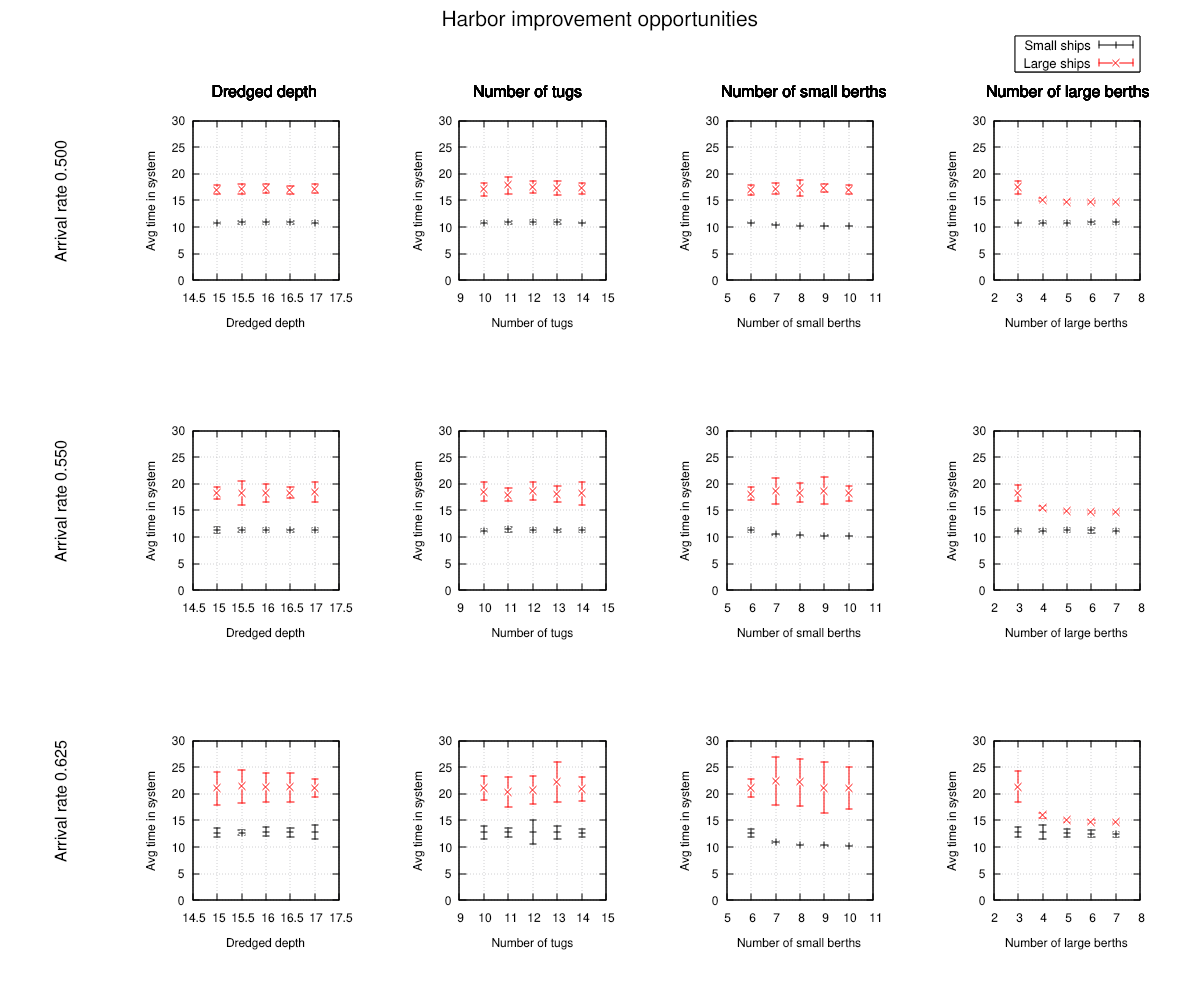
We see that we can tell our client, the SPA, that they have enough tugs and do not need to dredge, but that they really should consider building one more large berth, especially if traffic is expected to increase. However, building more than one does not make much sense even at the highest traffic scenario. The SPA should rather consider building another one or two small berths next.
This concludes our fourth tutorial. The code is in
tutorial/tut_4_2.c.
We have demonstrated the very powerful
cmb_condition allowing processes to wait for arbitrary combinations of
conditions in the simulated world. We also used the internal cmi_slist and
cmi_hashheap as
handy building blocks for other purposes, and leave it to you to discover additional
possibilities.
Adding CUDA GPU power for simulation physics
So far, our models have mostly used simple math. Important simulation tasks may require even more computing power than what we have used so far. For example, there might be complex physical and/or geometrical calculations, optimization algorithms to guide the actions of active agents in the simulated world, or even artificial intelligence and machine learning capabilities. Or we might want to have a hybrid simulation with hardware-in-the-loop for special cases.
Cimba does not include direct support for all possible combinations of GPUs and other hardware, but it does provide the necessary hooks to do this. In this tutorial, we will illustrate this by adding GPU processing power from Nvidia CUDA devices to handle model physics.
Moreover, we will distribute the workload across all available CUDA devices in the system by assigning each POSIX pthread to a specific CUDA stream. This creates three distinct levels of concurrency within our simulation: The POSIX pthreads executing trials, the Cimba processes (asymmetric coroutines) that are the active entities inside each trial, and the CUDA cores providing massively parallel physics numbercrunching within our simulated processes.
The AWACS scenario on a single CPU
Our simulation scenario is an Airborne Early Warning and Control System flying over some landscape. There are many ground targets to be detected and tracked. For each target and each timestep, we need to figure out if the target is in the beam of the radar, if it is hidden by terrain or earth curvature, and if the reflected signal is strong enough to be detected among atmospheric attenuation and ground clutter. We want to analyze some aspect of the AWACS operation. For the purposes of this tutorial, we assume that the relevant measure of outcome is target detection as a function of AWACS altitude. We use ParaView for visualization:
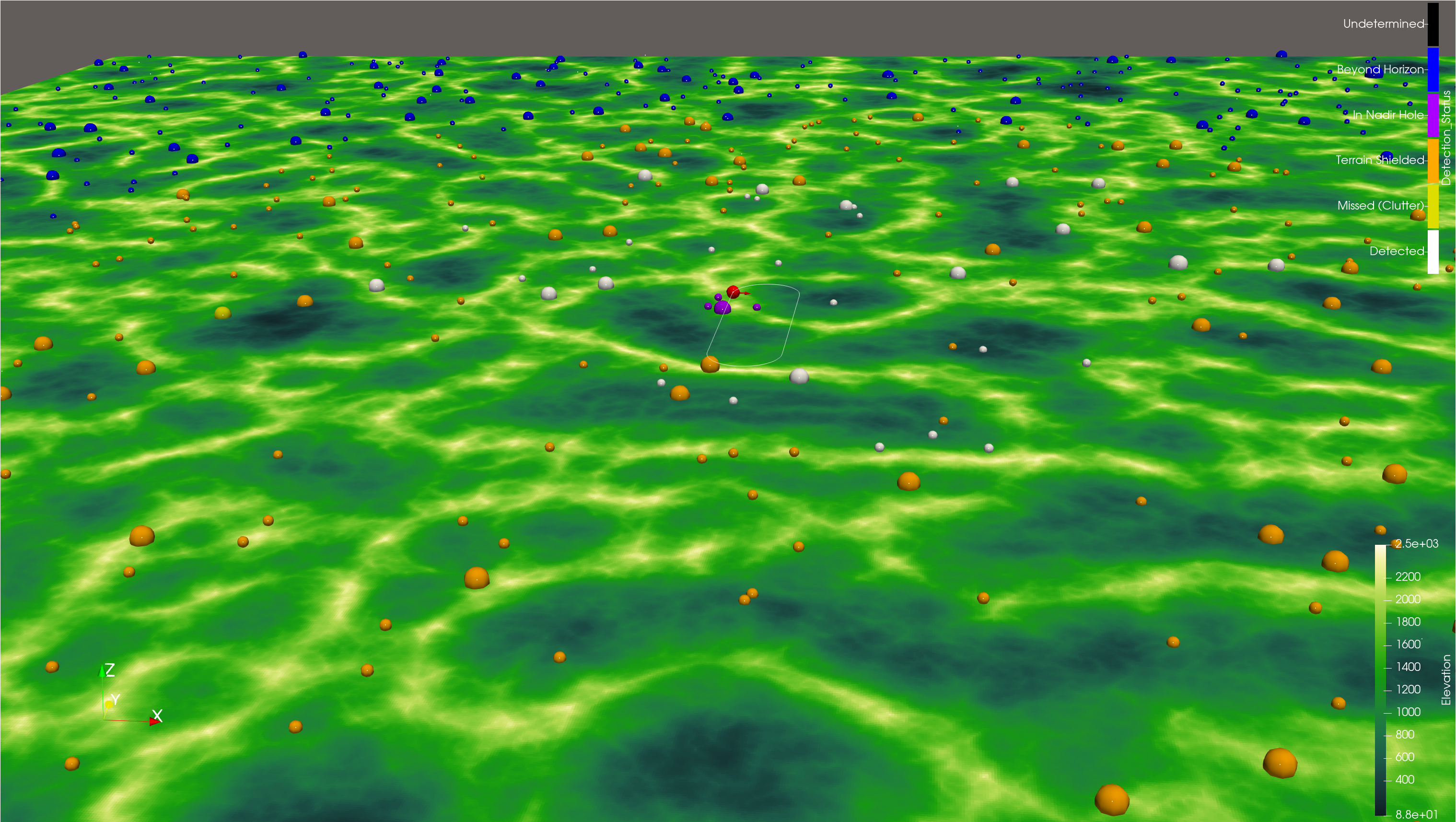
In this snapshot, we see our simulated AWACS (red) flying a racetrack pattern over a simulated terrain. The terrain model is a synthetic 1000 x 1000 nautical mile patch generated by Perlin noise with 1 arcsecond (~30 m) resolution. It is divided in three altitude-dependent biomes with different clutter and reflectivity parameters, representing farmland and urban areas in the valleys, forested hill slopes in middle altitudes, and bare mountain at high altitude. The altitude for any particular coordinates in the model is calculated by bi-directional linear interpolation between the terrain grid points. The terrain map is very large, nearly 3,6 billion points and 13,4 GB. Our visualization program ParaView is not able to handle this large data sets without crashing. For that reason, we decimate the terrain by a factor of 32 before writing it to a HDF5 file.
There are 1000 targets distributed randomly over the landscape. Each target is an
active cmb_process (coroutine) looping through four distinct states: Hiding (low
detectability), staging (medium detectability), firing (high detectability), and
driving (medium detectability). This represents some kind of mobile missile launcher
operating in a shoot-and-scoot pattern. After firing, it selects a random direction,
speed, and distance; and drives there before hiding stationary at the new location.
Target coordinates are recalculated on each sensor update. The target
sizes in the visualization represent the current radar cross
section (on a logarithmic scale).
The target color in the visualization represents the detection state, where the blue targets are beyond the radar horizon due to Earth’s curvature, the orange ones are shielded by terrain, the yellow ones are too weak to be detected in elevation-dependent ground clutter, and the white ones are successful detections. Just underneath the red AWACS indicator with the sensor lobe pointing towards the right, there are a handful of purple targets. These are in the “nadir hole” under the sensor platform, demonstrating the three-dimensional nature of this simulation example.
The airborne sensor, indicated by the red sphere with an arrow indicating the current beam direction, is a scanning, horizon-limited surveillance radar evaluated per dwell. The dwell interval is 0.04 seconds, aggregated to one-second updates for the animation program ParaView via HDF5 files.
Features included in this sensor model:
3D sensor-target geometry on a local tangent plane (WGS84 radii of curvature at the reference point)
Platform on a racetrack orbit with coordinated-turn bank angle.
Tropospheric refraction via an effective-Earth-radius k(h) derived from an exponential refractivity profile
Line-of-sight terrain masking by ray-marching the refracted ray against the terrain model, plus radar-horizon, elevation-limit, and nadir-cone gating.
Detection scaling from the radar equation (range^4, RCS), referenced to a calibrated range and RCS, with per-target-state RCS.
Surface clutter from a constant-gamma model, incidence angle dependent, gamma chosen per terrain biome and integrated over the resolution cell.
Cell-averaging CA-CFAR detection over non-coherently integrated pulses, above a thermal noise floor.
Doppler processing with a target state dependent ability to distinguish a target from the surrounding clutter. Hiding targets with velocity zero are difficult to distinguish from clutter, moving targets less so.
Specular multipath with a per-biome reflection coefficient attenuated by Rayleigh surface roughness.
Probabilistic detection drawn independently per dwell.
Deliberately omitted from the model:
Antenna detail: a hard azimuth beam-gate replaces the main-beam pattern; no sidelobes, sidelobe clutter, elevation pattern, or monopulse.
Waveform detail: no pulse-compression range sidelobes, range/Doppler ambiguities, or eclipsing; range resolution is a parameter.
Target fluctuation: fixed per-state RCS with a detection draw, not a Swerling case or a detailed geometric model per target.
Knife-edge diffraction (masking is hard geometric LOS), diffuse multipath, polarization, gaseous/rain attenuation, ducting, and ECM/ECCM.
Tracking: detections are per-dwell only. There is no association, M-of-N, or track formation.
The omitted features could of course also be added, but the chosen level of detail leaves a sufficiently realistic radar model to give reasonable and compute-intensive physics, while limiting the amount of technical detail not relevant to our current purpose. Our aim here is to provide a somewhat realistic geometry and and detection model to demonstrate physics modelling with Cimba and CUDA, not to build a complete radar model for actual military operations research.
The code can be found in tutorial/tut_5_1.c.
Note that the model output is written by a separate
cmb_process that takes a snapshot every second and appends it to the output file
for off-line animation. This decouples the output intervals (here 1 second) from the
simulation events (e.g., sensor dwells) and avoids cluttering simulation entities (like
the sensor or targets) with unrelated code.
Similarily, there is a separate cmb_process that only updates
a progress bar and an estimated completion time to keep the user informed during a
long-running program. The Cimba coroutines are computationally very efficient, so this
is a logical way to do any model housekeeping tasks that need to happen in simulation
time.
The important characteristic of this version of the model is that it is written single-threaded, for sequential execution on a single processor. In this case, the processor happens to be an AMD Threadripper 3970x with 128 GB RAM, but the program only uses one of the 64 CPU cores. Still, the model is relatively fast, and finishes each run of 6 hours simulated time in about 10 min 40 sec. Of this, the terrain generation takes about 530 seconds, while the simulation itself takes about 100 seconds.
CUDA to the rescue
CUDA can be described as a C++ based programming interface to the massively parallel computing capabilities of modern graphics processing units (GPUs). This is not intended to be a tutorial in CUDA programming, only an illustration of how to harness this computing power in a Cimba discrete event simulation. For more detail about CUDA programming, see, e.g., the Nvidia CUDA Toolkit.
For our purposes, the most important CUDA concept is the kernel. This is function that can be launched on a large number of GPU cores in parallel, all running the same code but acting on different data. A modern GPU can have 10000 or more cores. Structuring the program to use this efficiently without too much branching and serializing interdepency is one important concern in writing an efficient CUDA program.
Another concern is memory usage. The GPU has onboard VRAM with caches at several levels. The proessing cores may be faster than the memory, and certainly much faster than the data bus connecting CPU and GPU. Minimizing the need to copy large amounts of memory back and forth between CPU and GPU will be an inmportant determinant for the resulting performance.
Looking at our simulation in tut_5_1.c, there are two clear opportunities for CUDA use:
The synthetic terrain generation. This calculates the terrain altitudes for each of nearly 3,6 billion points, about 13.4 GB. (If your GPU has less memory, you may want to reduce the terrain size before building this tutorial.) Importantly, the altitude of each point is calculated independently and does not depend on the values of neighboring points. This is what is called an embarassingly parallel problem. In principle, we can just throw all the points to the GPU, ask it to calculate the map, and let the GPU scheduler do the load balancing.
The sensor detection logic. For each time step (radar dwell, here every 0.04 s), the sensor needs to check each of the 1000 targets for beam coverage, radar horizon, terrain shielding, clutter masking, and so forth. This is not quite as obviously parallel as the terrain generation, since the logic also contains a fair amount of branching, but still a clear candidate for parallelization.
As one might expect, there is a bit more to it. A naïve implementation - take the C code and rebrand it as CUDA - will most likely run slower than the CPU-only program. We will address the terrain first.
We do not want to shuffle a 13.4 GB data object back and forth between the GPU and CPU. Once generated on the GPU, the terrain map stays there, in the VRAM of the GPU that generated it. Code that needs to access the terrain map must run on the GPU. For visualization output, we also decimate the map on the GPU and only pass back the exact data that need to be written to file, nothing more. Moreover, it turns out that CUDA has a specialized type of memory object, a texture, that happens to be optimized for the kind of ray tracing we will be doing to check for intersections between the radar beam and terrain. So, the terrain map is implemented as a CUDA texture in VRAM.
Getting the best out of the detection logic also requires some thought. At each sensor update, we can run a first triage kernel to check each target against the easy conditions, such as in beam, in horizon, etc. The surviving candidates can then be fed to a second kernel to do the actual ray-marching from target to sensor to check for line-of-sight (suitably accounting for atmospheric diffraction), and finally the probabilistic detection attempt for the potentially visible candidates. Again, we want to reduce the amount of data that goes to the visualization, so we let the output process take snapshots of the targets array once per second and append those to the events file.
This version of the program consists of the three files tut_5_2.c, tut_5_2.h, and tut_5_2.cu. It runs in about 12 seconds, 50 times faster than the CPU-only version. The most time-consuming part of the CPU-only version, terrain generation, now only takes 0.7 seconds (about 750 times faster), while the simulation itself takes 11 seconds (9.4 times faster). The output looks the same as before.
But we are still running on just one CPU core, and there is actually another GPU in the rig, so we are far from firing on all cylinders here. Let’s put them all to work.
Pthreads, coroutines, and CUDA kernels
We will in principle do the same as in our first tutorial: Set up an experiment array of trial structs, each one initialized with the relevant simulation parameters, where the Cimba worker threads can help themselves to the next trial and store the results.
The only complication is handling the terrain map between trials. Since generating it
is so fast on CUDA, we could just generate a new one for each trial at very little cost.
However, for the purposes of this simulation, we will not do that. Instead, we will
count up how many GPUs we have available, generate one terrain map per GPU, and let
the terrain map become a parameter for the simulation. We can do this from main()
like this:
/* What compute horsepower do we have available? */
int n_gpus = 0;
CUDA_CHECK(cudaGetDeviceCount(&n_gpus));
if (n_gpus < 1) {
    fprintf(stderr, "No CUDA devices found\n");
    return EXIT_FAILURE;
}

const uint32_t n_terrains = (uint32_t)n_gpus;   /* one terrain per GPU */
struct terrain **terrains = cmi_calloc(n_terrains, sizeof(*terrains));

for (uint32_t t = 0u; t < n_terrains; t++) {
    CUDA_CHECK(cudaSetDevice((int)t));
    terrains[t] = terrain_create();

    /* Deterministic, distinct seed per terrain */
    const uint64_t terr_seed = cmb_random_fmix64(master_seed, SEED_TERRAIN + t);
    terrain_initialize(terrains[t], fwidth_nm, fheight_nm, ref_lat, ref_lon, terr_seed);

    /* Set biome tables per GPU stream */
    sensor_gpu_load();
 }
CUDA_CHECK is a macro to check the outcome of the CUDA calls, see tut_5_3.h. The
last function call sensor_gpu_load() creates a lookup-table for the GPUs to use,
defined as C-callable CUDA code in tut_5_3.cu. It saves a few compute cycles on each
trial since these lookup values are unchanged across trials.
We want to find out the effect of AWACS altitude on the detection ability. We will set up our experiment as a series of trials for flight levels from FL100 (feet x 100, about 3000 m) up to FL400 (about 12100 m) in 15 steps of 25 each. We have two GPU’s available, so we will try each flight level on two different terrain maps. And we want 10 replications for each combination of flight level and map, in total 300 trials. We can then create the experiment in the usual way:
printf("Setting up experiment\n");
const double fl_start = 100.0;
const double fl_step = 25.0;
const uint32_t n_levels = 15u;
const uint32_t n_trials = n_levels * n_terrains * n_replications;

struct trial *experiment = cmi_calloc(n_trials, sizeof(*experiment));

uint32_t ui_trl = 0u;
double flt_lvl = fl_start;
for (uint32_t ul = 0u; ul < n_levels; ul++) {
    for (uint32_t ut = 0u; ut < n_terrains; ut++) {
        for (uint32_t ur = 0u; ur < n_replications; ur++) {
            experiment[ui_trl].flight_level = flt_lvl;
            experiment[ui_trl].terrain = terrains[ut];
            experiment[ui_trl].seed = cmb_random_fmix64(master_seed, SEED_TRIAL + ui_trl);
            experiment[ui_trl].dur_s = dur_h * 3600.0;

            /* Sentinel value to detect aborted trials */
            experiment[ui_trl].num_found = -1;

            ui_trl++;
        }
    }

    flt_lvl += fl_step;
}
Note how we use cmb_random_fmix64() to generate unique-but-deterministic seeds for
each trial. We could simply call cmb_random_hwseed() to obtain unique seeds from
CPU entropy as in earlier tutorial examples, but it would not be reproducible. Instead,
cmb_random_fmix64() hashes the master seed (from CPU entropy or command line argument)
with a per-trial value to set the seed to use per trial.
Only one thing remains: The worker threads need to know what CUDA streams to use. Ciba
provides this critical connection by the function cimba_thread_hooks_set(). It
takes three arguments. First a pointer to an initializing function, second an argument
to be passed to that function when called, and third a pointer to an exit function.
For our AWACS model, the init function could look like this:
static void *gpu_thread_init(uint64_t tid, void *usrarg)
{
    cmb_unused(tid);

    const int n_gpus = (int)(intptr_t)usrarg;
    struct gpu_thread_ctx *ctx = cmi_malloc(sizeof(*ctx));
    ctx->n_gpus  = n_gpus;
    ctx->streams = cmi_malloc((size_t)n_gpus * sizeof(cudaStream_t));
    for (int d = 0; d < n_gpus; d++) {
        CUDA_CHECK(cudaSetDevice(d));
        CUDA_CHECK(cudaStreamCreate(&ctx->streams[d]));
    }

    return ctx;
}
The first argument, tid, is the thread identifier, not used here. The second
argument is a void * that can point to anything the application needs to pass to a
worker thread. In this case, we simply pass the number of GPUs in the system. We could
also obtain that number directly by calling CUDA_CHECK(cudaGetDeviceCount(&n_gpus))
from here, but we already did it, and we wanted to show how to pass an argument to this
thread initializing function.
The function creates a thread context for the worker thread’s use. Here, it is a lookup table of CUDA streams, one per GPU. Each worker thread running this will set up a CUDA stream per GPU in the system.
It then returns a void *, again basically anything the application wants to store
as a thread context. The return value will be stored in thread local memory once the
thread starts running, and can be obtained from user code by calling
cimba_thread_context().
Internally in cimba.c the following happens:
/* User-defined context per thread */
CMB_THREAD_LOCAL void *cmi_thread_context = NULL;
/* Any user-defined initialization needed? */
if (cmg_thread_init_func != NULL) {
    cmi_thread_context = cmg_thread_init_func(tid, cmg_thread_init_usrarg);
}
One example of using this is in tut_5_3.c’s run_trial() function. The first thing
it does is to look up what device the terrain map to use is on, and then to look up its
CUDA stream for that device:
void run_trial(void *vtrl)
{
    cmb_assert_release(vtrl != NULL);
    struct trial *trl = vtrl;
    struct terrain *terp = trl->terrain;

    const int dev = terp->device;
    CUDA_CHECK(cudaSetDevice(dev));
    const struct gpu_thread_ctx *ctx = cimba_thread_context();
    cudaStream_t stream = ctx->streams[dev];

    /* ... */
The corresponding exit function cleans up the memory allocations before exiting
the worker thread, receiving the stored cmi_thread_context as its argument.
Whatever the return value from the init function is, the exit function will receive it
as its argument.
static void gpu_thread_exit(void *vctx)
{
    struct gpu_thread_ctx *ctx = vctx;
    if (ctx == NULL) return;
    for (int d = 0; d < ctx->n_gpus; d++) {
        cudaSetDevice(d);
        cudaStreamDestroy(ctx->streams[d]);
    }

    cmi_free(ctx->streams);
    cmi_free(ctx);
}
Our main() can then run the experiment, ensuring that the Cimba worker thread
associate each trial with its correct terrain map:
printf("Baiting the hooks\n");
cimba_thread_hooks_set(gpu_thread_init, (void *)(intptr_t)n_gpus, gpu_thread_exit);
printf("Running the simulation ...\n");
cimba_run(experiment, n_trials, sizeof(*experiment), run_trial);
This mechanism to set callback functions that execute at the beginning and end of each worker thread and store an application-defined thread local state is a very flexible (and somewhat abstract) tool. Here, we use it as the only real integration point between the Cimba worker threads and the CUDA streams. That is why it was created. However, it is not CUDA specific, and can also be used for other purposes such as integration to other GPGPU APIs or even hardware-in-the-loop purposes.
We also remove the per-trial visualization output and add a Gnuplot chart, compile and run, and get output like this:
[ambonvik@Threadripper cimba]$ time build/tutorial/tut_5_3
Setting up experiment
Using 64 threads
Baiting the hooks
Running the simulation ...
0   00:00:00.0      dispatcher      run_trial (755):  Start trial: Flight level: 100 GPU: 0 Seed: 0xaabc464bf835ba01
1   00:00:00.0      dispatcher      run_trial (755):  Start trial: Flight level: 100 GPU: 0 Seed: 0x0187615b9b563892
2   00:00:00.0      dispatcher      run_trial (755):  Start trial: Flight level: 100 GPU: 0 Seed: 0xfdf3e1d69dc021f1
3   00:00:00.0      dispatcher      run_trial (755):  Start trial: Flight level: 100 GPU: 0 Seed: 0x166396ef78583e12
4   00:00:00.0      dispatcher      run_trial (755):  Start trial: Flight level: 100 GPU: 0 Seed: 0xbe4c7beb66bfa52d
5   00:00:00.0      dispatcher      run_trial (755):  Start trial: Flight level: 100 GPU: 0 Seed: 0x53665865db06f479
6   00:00:00.0      dispatcher      run_trial (755):  Start trial: Flight level: 100 GPU: 0 Seed: 0x4e7eaff0ecc53516
7   00:00:00.0      dispatcher      run_trial (755):  Start trial: Flight level: 100 GPU: 0 Seed: 0x4836e23a98da025c
8   00:00:00.0      dispatcher      run_trial (755):  Start trial: Flight level: 100 GPU: 0 Seed: 0xc7fcca2edd7e7672
9   00:00:00.0      dispatcher      run_trial (755):  Start trial: Flight level: 100 GPU: 0 Seed: 0x4f08ba1ab652f797
11  00:00:00.0      dispatcher      run_trial (755):  Start trial: Flight level: 100 GPU: 1 Seed: 0x1b6791020c37e265
13  00:00:00.0      dispatcher      run_trial (755):  Start trial: Flight level: 100 GPU: 1 Seed: 0x24f4a0c7a2b7fc85
14  00:00:00.0      dispatcher      run_trial (755):  Start trial: Flight level: 100 GPU: 1 Seed: 0x8ca5527f505a41cc
16  00:00:00.0      dispatcher      run_trial (755):  Start trial: Flight level: 100 GPU: 1 Seed: 0xe91fddb0016691b5
12  00:00:00.0      dispatcher      run_trial (755):  Start trial: Flight level: 100 GPU: 1 Seed: 0xd32c5262396d4a28
21  00:00:00.0      dispatcher      run_trial (755):  Start trial: Flight level: 125 GPU: 0 Seed: 0x5ae7ed646f78f29c
10  00:00:00.0      dispatcher      run_trial (755):  Start trial: Flight level: 100 GPU: 1 Seed: 0x54a883eb38e018ca
17  00:00:00.0      dispatcher      run_trial (755):  Start trial: Flight level: 100 GPU: 1 Seed: 0xd4c7af89365af186
18  00:00:00.0      dispatcher      run_trial (755):  Start trial: Flight level: 100 GPU: 1 Seed: 0x79ee62007b579a97
19  00:00:00.0      dispatcher      run_trial (755):  Start trial: Flight level: 100 GPU: 1 Seed: 0x6aef2b4d821bf4ba

...

263 06:00:00.0      dispatcher      run_trial (834):  End trial: Flight level: 425 Found: 220
261 06:00:00.0      dispatcher      run_trial (834):  End trial: Flight level: 425 Found: 209
262 06:00:00.0      dispatcher      run_trial (834):  End trial: Flight level: 425 Found: 231
285 06:00:00.0      dispatcher      run_trial (834):  End trial: Flight level: 450 Found: 221
283 06:00:00.0      dispatcher      run_trial (834):  End trial: Flight level: 450 Found: 215
289 06:00:00.0      dispatcher      run_trial (834):  End trial: Flight level: 450 Found: 244
281 06:00:00.0      dispatcher      run_trial (834):  End trial: Flight level: 450 Found: 213
284 06:00:00.0      dispatcher      run_trial (834):  End trial: Flight level: 450 Found: 205
280 06:00:00.0      dispatcher      run_trial (834):  End trial: Flight level: 450 Found: 248
287 06:00:00.0      dispatcher      run_trial (834):  End trial: Flight level: 450 Found: 220
286 06:00:00.0      dispatcher      run_trial (834):  End trial: Flight level: 450 Found: 227
282 06:00:00.0      dispatcher      run_trial (834):  End trial: Flight level: 450 Found: 221
288 06:00:00.0      dispatcher      run_trial (834):  End trial: Flight level: 450 Found: 232
Finished, calculating stats

real        1m13.137s
user        34m35.338s
sys 7m0.024s
We just ran 300 trials of our AWACS simulation in 73 seconds of wall clock time on a desktop PC. Each trial ran for 6 simulated hours, involved 1000 active targets on a 1000 x 1000 nautical mile map with 1 arcsecond resolution, and an active radar with dwell time of 0.04 seconds doing raymarching against the terrain map for each dwell. The experiment produced this chart for the number of targets detected as a function of the AWACS flight level:
By default, Cimba will put one worker thread per CPU core reported by the operating system. That is often twice the number of physical CPU cores.
Cimba also provides functions to manage this. One can get the number of Cimba threads
by calling uint32_t cimba_threads_num() and set the number of threads to be used by
calling uint32_t cimba_threads_use(uint32_t n_threads). The argument 0 means
“use default”. It will return the number of threads actually used used, i.e., the
number of CPU cores if given the argument 0.
The optimal number of threads to use will depend on the task. In general, using a number of threads between 1.5 to 2.5 times the number of physical CPU cores is close to optimal, with a rather flat curve through that region and random run-to-run variation swamping any meaningful differences. The Cimba default number of threads is a reasonable choice.
Summary
In these five tutorials, we have gone from a basic M/M/1 queue simulation to a near military grade AWACS scenario running on 64 CPU cores and two GPUs (10496 cores each) in parallel, efficiently utilizing all the compute power available on a recent multi-core, multi-GPU desktop PC for discrete event simulation. For more detailed information about the various features of Cimba, please see the in-depth the background section and the detailed API reference pages.